Cloud ERP vs On-Premise ERP: Which Is Better for Your Business?
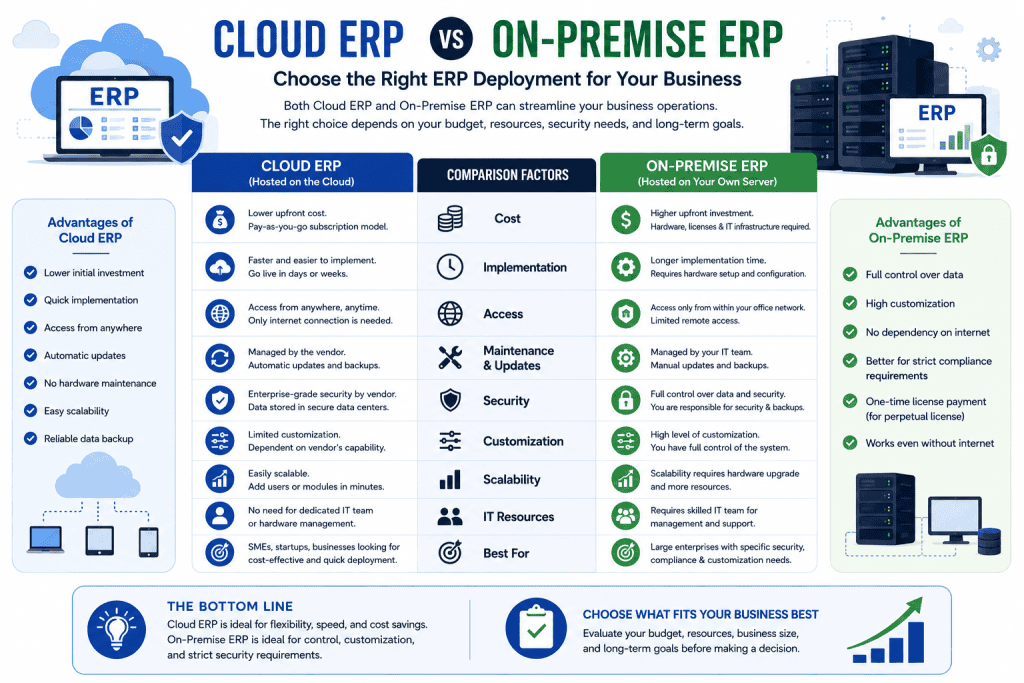
Choosing between Cloud ERP and On-Premise ERP is an important decision for businesses planning to implement an Enterprise Resource Planning system. Both options can help businesses manage accounting, inventory, sales, purchasing, HR, manufacturing, and other operations, but they differ significantly in hosting, cost, maintenance, security, scalability, and accessibility.
This guide explains the key differences between Cloud ERP vs On-Premise ERP and helps businesses determine which ERP deployment model is more suitable for their needs.
What Is Cloud ERP?
Cloud ERP is an ERP system hosted on remote servers and accessed through the internet. Instead of maintaining the ERP infrastructure on your own premises, the software and database are hosted by a cloud provider or ERP service provider.
Employees can typically access the system using a web browser or supported application from different locations.
Common characteristics of Cloud ERP include:
- Internet-based access
- Remote server hosting
- Automatic software updates
- Centralized data
- Flexible user access
- Scalable infrastructure
- Reduced hardware requirements
Cloud ERP is particularly useful for businesses with multiple branches, remote employees, or teams that need access to business information from different locations.
What Is On-Premise ERP?
On-Premise ERP is installed and operated on servers owned or controlled by the business. The company is responsible for managing the hardware, operating environment, security, backups, and much of the technical infrastructure.
An on-premise ERP setup may require:
- Dedicated servers
- Network infrastructure
- Backup systems
- IT administrators
- Security controls
- Software maintenance
- Hardware maintenance
Businesses that require greater control over their infrastructure may prefer an on-premise ERP deployment.
Cloud ERP vs On-Premise ERP: Key Differences
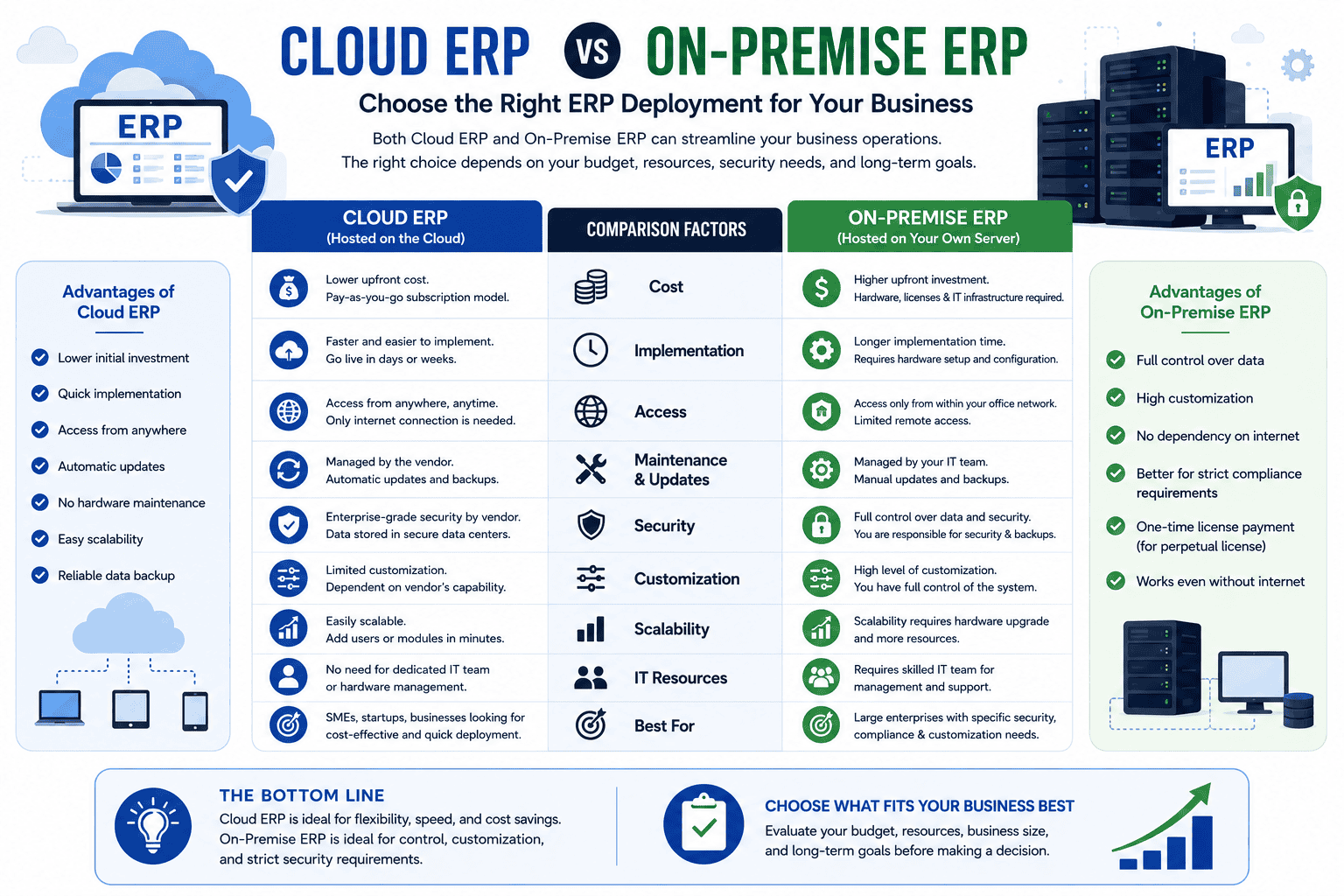
The main differences between Cloud ERP and On-Premise ERP are related to infrastructure, ownership, accessibility, cost, maintenance, and scalability.
| Factor | Cloud ERP | On-Premise ERP |
|---|---|---|
| Hosting | Cloud provider/server | Business-owned or controlled server |
| Initial Cost | Usually lower | Usually higher |
| Hardware | Minimal business hardware | Requires server infrastructure |
| Accessibility | Internet-based | Usually local network or configured remote access |
| Maintenance | Mostly provider-managed | Business-managed |
| Updates | Often automatic | Usually manually managed |
| Scalability | Generally easier | May require additional hardware |
| IT Management | Lower requirement | Higher requirement |
| Remote Access | Easy | Requires additional configuration |
| Infrastructure Control | Lower | Higher |
Cloud ERP vs On-Premise ERP: Cost
Cost is one of the biggest factors when comparing Cloud ERP and On-Premise ERP.
Cloud ERP Costs
Cloud ERP commonly uses a subscription-based pricing model. Depending on the provider, the subscription may include some combination of:
- Software access
- Hosting
- Security
- Backups
- Updates
- Technical infrastructure
However, businesses may still have additional costs for implementation, customization, integrations, training, and support.
On-Premise ERP Costs
On-premise ERP generally requires a larger initial investment.
Businesses may need to purchase:
- Servers
- Networking equipment
- Operating systems
- Database infrastructure
- Backup systems
- Security solutions
There may also be recurring costs for IT staff, hardware maintenance, upgrades, electricity, backups, and technical support.
Therefore, businesses should compare Total Cost of Ownership (TCO) rather than only comparing the ERP license or subscription price.
Accessibility and Remote Work
Cloud ERP has a major advantage when employees need to access business information from different locations.
With a properly configured cloud system, authorized users can access ERP applications through the internet.
This can be useful for:
- Multiple branches
- Remote employees
- Sales teams
- Managers traveling between locations
- Businesses with distributed operations
On-premise ERP can also support remote access, but it may require additional networking, VPN, security, and server configuration.
Maintenance and Updates
Cloud ERP
With Cloud ERP, much of the infrastructure management is handled by the cloud or ERP provider.
Depending on the agreement, the provider may manage:
- Server infrastructure
- System updates
- Security patches
- Backups
- Infrastructure monitoring
This can reduce the technical workload for internal IT teams.
On-Premise ERP
With On-Premise ERP, the business has greater responsibility for maintaining the infrastructure.
The IT team may need to manage:
- Server performance
- Software updates
- Security patches
- Database maintenance
- Backups
- Hardware failures
This gives the company more control but also creates additional responsibilities.
Security: Cloud ERP vs On-Premise ERP
Security is often misunderstood when comparing these two models.
Cloud ERP is not automatically less secure, and On-Premise ERP is not automatically more secure.
Security depends on factors such as:
- Access control
- User permissions
- Encryption
- Authentication
- Backup procedures
- Network security
- Security monitoring
- Software updates
- IT management
A professional cloud provider may have strong security infrastructure, while a poorly managed on-premise server can create significant security risks.
Businesses should evaluate the actual security practices of the ERP provider rather than choosing a deployment model based solely on assumptions.
Scalability
Cloud ERP generally makes it easier to scale infrastructure as a business grows.
For example, a growing company may need:
- More users
- More storage
- Additional modules
- Multiple branches
- Higher server capacity
Cloud infrastructure can often be expanded without purchasing physical servers.
With On-Premise ERP, business growth may require additional hardware, storage, networking capacity, or server upgrades.
Customization
Both Cloud ERP and On-Premise ERP can support customization, but the level of flexibility depends on the ERP platform and deployment architecture.
Businesses may require:
- Custom workflows
- Custom reports
- Industry-specific features
- Third-party integrations
- Custom dashboards
- Automated processes
On-premise environments can provide greater control over the underlying infrastructure, while modern cloud ERP platforms can also offer extensive customization through supported development frameworks and APIs.
Therefore, customization capability should be evaluated at the ERP software level, not simply based on whether it is cloud or on-premise.
Internet Dependency
Cloud ERP normally requires a reliable internet connection because users access the system remotely.
If internet connectivity is poor, employees may experience difficulty accessing the ERP.
This is an important consideration for businesses operating in areas with unreliable connectivity.
On-premise ERP can continue to operate within the local network even when the external internet connection is unavailable, depending on the system architecture and required features.
Cloud ERP vs On-Premise ERP for Small Businesses
For many small businesses, Cloud ERP can be attractive because it reduces the need for purchasing and maintaining server infrastructure.
A small business may benefit from:
- Lower initial infrastructure investment
- Easier remote access
- Simplified maintenance
- Flexible scalability
- Faster deployment
However, the business should carefully evaluate recurring subscription costs and internet dependency.
Cloud ERP vs On-Premise ERP for Medium and Large Businesses
Medium and large businesses often have more complex requirements.
They may need:
- Multiple branches
- Advanced reporting
- Manufacturing
- Supply chain management
- Large numbers of users
- Third-party integrations
- Strong internal IT controls
Cloud ERP can provide scalability and centralized management, while On-Premise ERP may be preferable when an organization needs extensive infrastructure control or has specific internal IT requirements.
Advantages of Cloud ERP
The main advantages of Cloud ERP include:
- Lower upfront infrastructure investment
- Easy remote access
- Reduced hardware requirements
- Easier scalability
- Centralized data
- Simplified infrastructure management
- Faster deployment in many cases
- Suitable for distributed teams
Disadvantages of Cloud ERP
Cloud ERP can also have limitations:
- Dependence on internet connectivity
- Recurring subscription costs
- Less direct control over infrastructure
- Dependence on the service provider
- Potential data migration challenges when changing providers
Businesses should carefully review the provider’s service terms, backup policies, security practices, and data ownership policies.
Advantages of On-Premise ERP
On-Premise ERP can provide:
- Greater infrastructure control
- More control over data storage
- Local network operation
- Greater control over update timing
- Potentially more flexibility for specific infrastructure requirements
It can be suitable for organizations with strong internal IT capabilities and specific infrastructure or compliance requirements.
Disadvantages of On-Premise ERP
The disadvantages may include:
- Higher initial infrastructure costs
- Server maintenance requirements
- Hardware replacement costs
- Greater IT management responsibility
- More complex remote access
- Manual update and backup management
- Additional infrastructure management
Which Is Better: Cloud ERP or On-Premise ERP?
There is no universal answer.
Cloud ERP may be better if your business wants:
- Lower upfront infrastructure costs
- Remote accessibility
- Easy scalability
- Reduced server management
- Faster deployment
On-Premise ERP may be better if your business needs:
- Greater infrastructure control
- Local server operation
- Specific internal IT requirements
- Direct control over server management
- Reduced dependence on external cloud infrastructure
The right choice depends on your business size, budget, IT capabilities, security requirements, connectivity, number of users, and long-term growth plans.
Cloud ERP vs On-Premise ERP: Decision Checklist
Before selecting an ERP deployment model, consider these questions:
- How many users will access the ERP?
- Does the business have multiple branches?
- Do employees need remote access?
- How reliable is the internet connection?
- Does the company have an internal IT team?
- What is the available ERP budget?
- Does the business require extensive customization?
- How important is infrastructure control?
- What are the data backup requirements?
- How quickly is the business expected to grow?
Answering these questions can make the decision much easier.
Final Thoughts
The choice between Cloud ERP vs On-Premise ERP should be based on business requirements rather than simply choosing the cheaper option.
Cloud ERP generally offers easier accessibility, scalability, and reduced infrastructure management, while On-Premise ERP provides greater control over the company’s own infrastructure.
For many growing businesses, Cloud ERP can be a practical choice. However, organizations with specific infrastructure, control, or internal IT requirements may find On-Premise ERP more appropriate.
The most important step is to compare the total cost, functionality, security, scalability, implementation requirements, and long-term business value before making a decision.