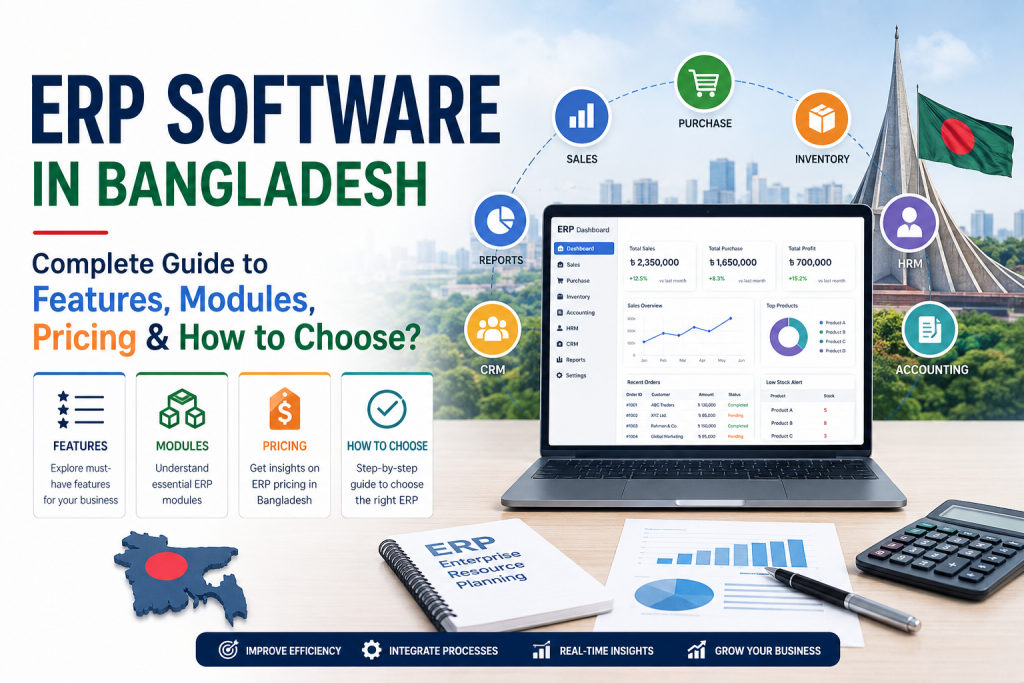
1.What Is ERP Software?
ERP Software is a business management system that helps organizations manage and connect different business operations through a centralized platform. Instead of using separate tools for sales, accounting, inventory, purchasing, human resources, and other activities, businesses can use an ERP system to manage these processes in one integrated environment.
ERP stands for Enterprise Resource Planning. Modern ERP software helps businesses collect, organize, process, and analyze business data so that owners and managers can make faster and more informed decisions.
For example, when a customer places an order, an integrated ERP system can connect the sales process with inventory, purchasing, accounting, and reporting. This reduces manual data entry, minimizes errors, and gives the business a clearer view of its overall operations.
If you are new to ERP, start by learning what ERP software is and how it works before exploring its features, modules, pricing, and implementation.
What Does ERP Stand For?
ERP stands for Enterprise Resource Planning.
The term originally focused on planning and managing enterprise resources, but modern ERP systems have evolved into comprehensive business management platforms.
Depending on the business, an ERP system may include:
- Accounting & Finance
- Sales Management
- Inventory Management
- Purchase Management
- Customer Relationship Management (CRM)
- Human Resource Management (HRM)
- Payroll Management
- Manufacturing Management
- Supply Chain Management
- Point of Sale (POS)
- eCommerce Integration
- Business Reporting & Analytics
The main purpose is to connect these functions and allow them to work with shared business data.
Why Is ERP Software Important for Businesses?
As a business grows, managing operations through spreadsheets, paper records, separate accounting software, messaging apps, and disconnected systems becomes increasingly difficult.
For example, a business may have:
Sales → WhatsApp / Manual Orders
Inventory → Excel Spreadsheet
Accounting → Separate Software
Customer Data → Notebook / Spreadsheet
Purchasing → Manual Records
Reports → Manually Prepared
This creates data duplication, communication gaps, calculation errors, and delays in decision-making.
An ERP Software system brings these processes together into a connected business management environment.
Key Reasons Businesses Use ERP
1. Centralized Business Data
ERP keeps important business information in one centralized system. Authorized users can access relevant data without maintaining multiple disconnected files.
2. Reduced Manual Work
ERP can automate repetitive tasks such as sales processing, inventory updates, invoice generation, purchase workflows, and financial entries.
3. Better Inventory Control
Businesses can track stock levels, purchases, sales, product movements, and inventory availability more efficiently.
4. Faster Business Reporting
Managers can access dashboards and reports to understand sales, expenses, inventory, profitability, and other important business metrics.
5. Improved Decision-Making
When accurate business data is available in one place, management can make decisions based on current information rather than assumptions or outdated spreadsheets.
6. Better Coordination Between Departments
Sales, inventory, purchasing, accounting, HR, and management can work from connected information instead of maintaining separate records.
7. Scalability
A suitable ERP solution can help businesses manage increasing customers, products, transactions, employees, branches, and business operations as they grow.
Traditional or Manual System vs ERP Software
Many small and medium-sized businesses still depend heavily on paper records, Excel spreadsheets, separate software, and manual communication.
These methods can work when the business is very small. However, as transaction volume and operational complexity increase, managing everything manually becomes difficult.
| Traditional / Manual System | ERP Software |
| Separate records and files | Centralized business data |
| Manual data entry | Automated workflows |
| Difficult to track real-time inventory | Real-time inventory visibility |
| Reports often require manual preparation | Automated reports and dashboards |
| Data may be duplicated | Shared database |
| Higher risk of human error | Reduced repetitive data entry |
| Departments may work separately | Integrated departments |
| Difficult to scale | Designed for business growth |
| Limited visibility | Better real-time visibility |
| More dependency on individual employees | Standardized business processes |
Why Is the Need for ERP Software Increasing in Bangladesh?
The need for ERP Software in Bangladesh is growing as businesses become more organized, competitive, and technology-driven.
Bangladeshi businesses across manufacturing, trading, retail, distribution, eCommerce, healthcare, education, agriculture, and service industries increasingly need better ways to manage growing operational complexity.
Several factors are contributing to this demand.
Growing Business Operations
When a business starts with a few products, employees, and customers, manual management may be sufficient. But as the business expands, the number of transactions, products, employees, suppliers, and customers also increases.
Managing this growing volume of information manually can become inefficient.
Increasing Inventory Complexity
Businesses dealing with hundreds or thousands of products need accurate information about stock availability, purchases, sales, damaged products, returns, and product movements.
An ERP system can help centralize and organize this information.
Multiple Sales Channels
Businesses may now sell through physical stores, websites, marketplaces, social media, sales representatives, and other channels.
Managing orders from multiple channels can become complicated without an integrated system.
Demand for Real-Time Business Information
Business owners increasingly need quick answers to questions such as:
- How much inventory is available?
- Which products are selling the most?
- What are today’s sales?
- How much money is receivable?
- Which suppliers need to be paid?
- What are the business expenses?
- Which branch is performing better?
- What is the current profitability?
ERP software can bring these types of business information into a centralized reporting environment.
2.How Does ERP Software Work?
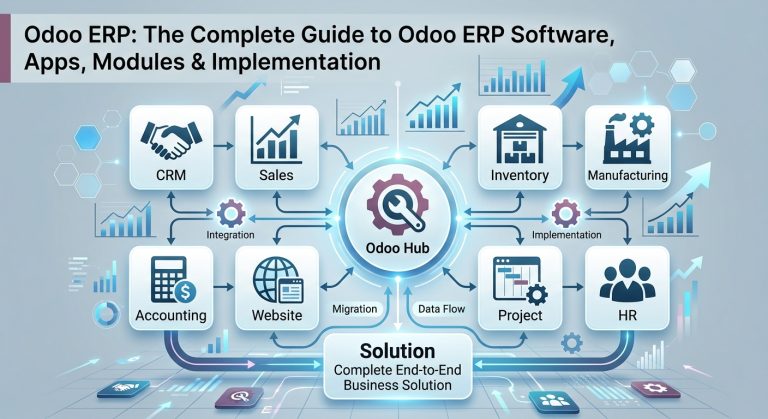
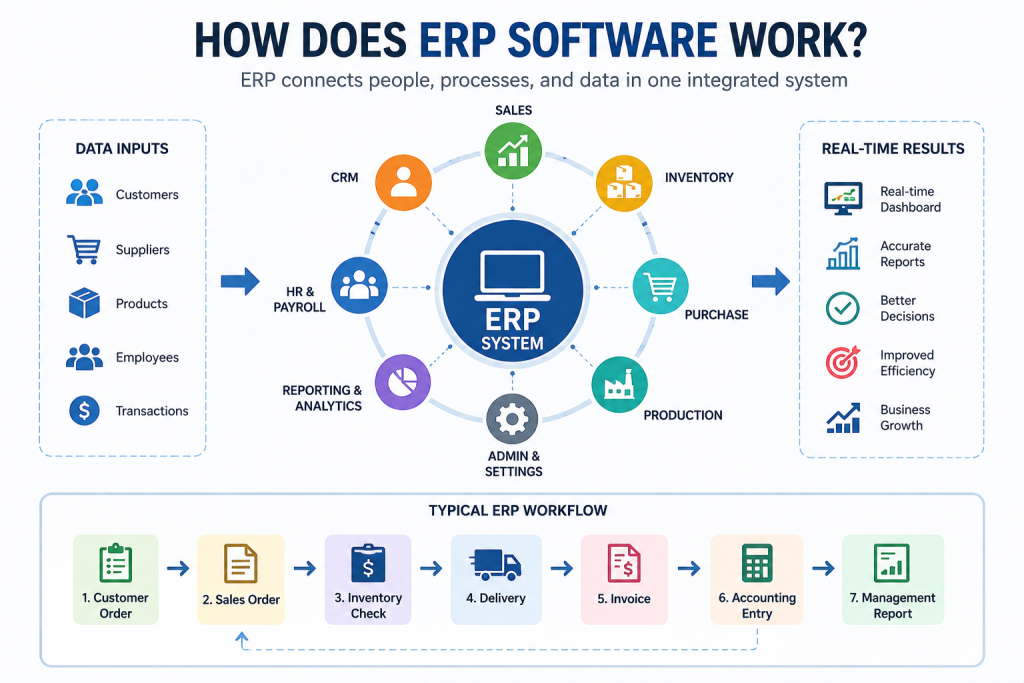
ERP Software connects different business departments through a centralized system. Instead of keeping sales, inventory, purchasing, accounting, and other business data in separate systems, ERP allows these departments to work with connected information.
How Does ERP Connect Different Business Departments?
When a customer places an order, the information can flow from the Sales module to Inventory, Accounting, and Reporting. This reduces duplicate data entry and helps different departments work with the same information.
Sales → Inventory → Accounting → Reporting
What Is a Centralized Database?
A centralized database stores important business information in one integrated system. This may include customer records, product information, inventory data, sales orders, purchase records, financial transactions, and employee information.
With a centralized database, authorized users can access the information they need from a common source instead of maintaining multiple separate files.
What Is Real-Time Business Data?
Real-time business data means information that is updated in the ERP system as business transactions occur.
For example, when a product is sold, the inventory level can be updated immediately while the related sales and accounting information is also recorded. This gives business owners and managers better visibility into current operations.
How Does an ERP Workflow Work?
A typical ERP workflow may look like this:
Customer Order
↓
Sales Order
↓
Inventory Check
↓
Product Delivery
↓
Invoice
↓
Accounting Entry
↓
Management Report
This integrated workflow allows different business processes to work together within one system. As a result, ERP Software can improve data accuracy, reduce manual work, and give businesses better control over their daily operations.
3. Why Do Businesses Need ERP Software?
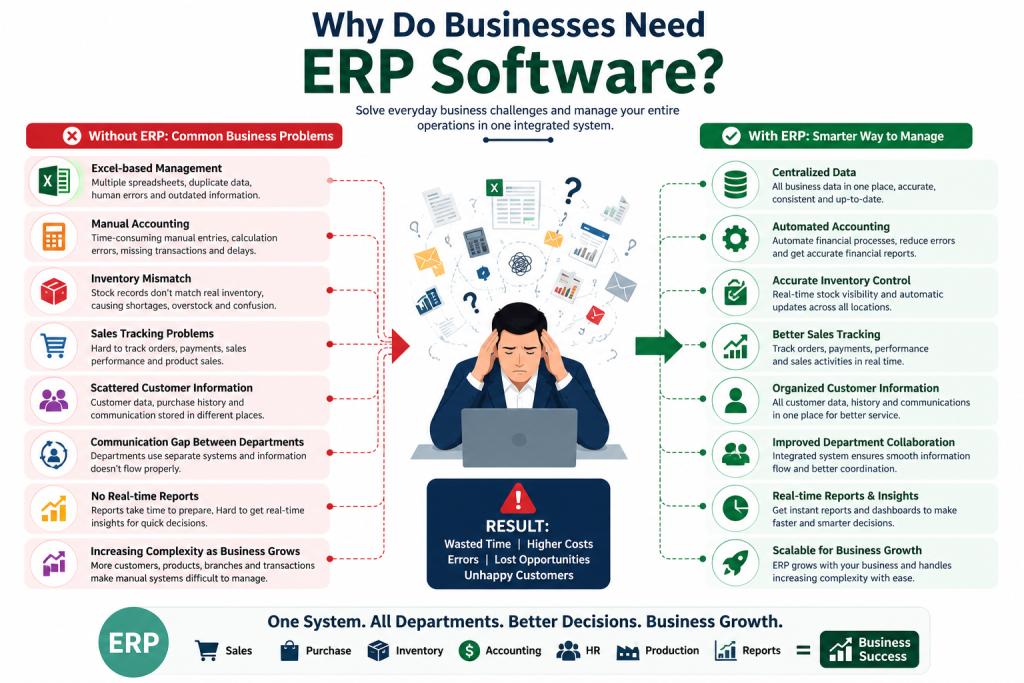
As a business grows, managing operations with spreadsheets, paper records, separate software, and manual processes becomes increasingly difficult. ERP Software helps businesses integrate their core operations, centralize information, automate repetitive tasks, and improve overall business visibility.
Here are some of the common problems businesses face without an integrated ERP system.
1. Excel-Based Management
Many businesses use Excel spreadsheets to manage sales, inventory, purchases, expenses, and customer information. While Excel can be useful for basic record-keeping, managing large volumes of business data across multiple files can lead to duplicate entries, outdated information, and human errors.
ERP Software provides a centralized system where business data can be managed more efficiently.
2. Manual Accounting
Manual accounting processes can take significant time and increase the risk of calculation errors, missing transactions, and delayed financial reporting. When sales, purchases, expenses, and payments are recorded separately, getting an accurate financial overview becomes more difficult.
An ERP system can connect accounting with sales, purchasing, inventory, and other business activities.
3. Inventory Mismatch
Inventory mismatch is a common problem when stock is tracked manually. The quantity recorded in a spreadsheet may not match the actual stock available in the warehouse or store.
An ERP system can help businesses track stock movements, purchases, sales, returns, and current inventory levels from a centralized platform.
4. Sales Tracking Problems
Without an integrated system, businesses may struggle to track sales orders, customer payments, product performance, and sales activity.
ERP software can connect sales processes with inventory and accounting, giving businesses better visibility into their sales operations.
5. Scattered Customer Information
Customer names, contact details, order history, payment records, and communication information may be stored in different files or platforms. This makes it harder for businesses to understand customer activity and provide consistent service.
An ERP system with CRM capabilities can organize customer information in one place.
6. Communication Gaps Between Departments
When sales, inventory, purchasing, accounting, and management use separate systems, important information may not be shared quickly or accurately.
ERP software connects different departments through shared business data and integrated workflows, reducing information gaps and improving coordination.
7. Lack of Real-Time Reports
Business owners need timely information to make effective decisions. If reports must be prepared manually by collecting data from different sources, management may not have an accurate view of current sales, inventory, expenses, or profitability.
ERP systems can provide centralized dashboards and reports based on updated business data.
8. Increasing Complexity as the Business Grows
A manual system may work for a small business with limited transactions. However, as the number of customers, products, employees, suppliers, orders, and branches increases, business operations become more complex.
ERP Software provides an integrated platform that can help businesses manage this growing complexity and create a scalable foundation for future growth.
Why ERP Matters
The purpose of ERP is not simply to replace Excel or manual records. The real value of an ERP system is its ability to connect business processes, centralize data, automate workflows, improve reporting, and give management better control over operations.
4. Main ERP Software Modules
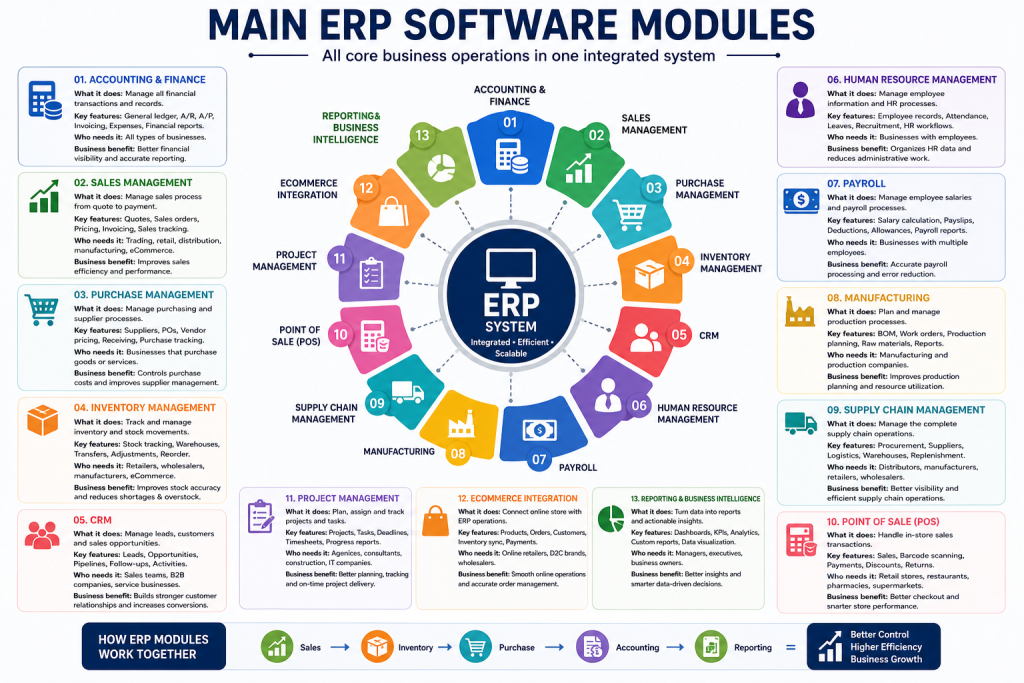
Modern ERP Software is built with different modules that manage specific areas of a business while sharing data through a centralized system. Businesses can choose the modules they need based on their industry, size, and operational requirements.
4.1 Accounting & Finance
What it does:
The Accounting & Finance module manages a business’s financial transactions, income, expenses, invoices, payments, and financial records.
Key features: General ledger, accounts payable, accounts receivable, invoicing, expense management, financial reports, and tax management.
Who needs it: Almost every business that needs organized financial management.
Business benefit: Provides better financial visibility, reduces manual accounting work, and helps management make informed financial decisions.
4.2 Sales Management
What it does:
The Sales Management module manages the complete sales process from quotations and sales orders to invoicing and delivery.
Key features: Quotations, sales orders, customer management, pricing, discounts, invoicing, and sales tracking.
Who needs it: Trading, retail, distribution, manufacturing, eCommerce, and service businesses.
Business benefit: Improves sales efficiency, reduces order-processing errors, and provides better visibility into sales performance.
4.3 Purchase Management
What it does:
The Purchase Management module helps businesses manage suppliers, purchase orders, procurement, and incoming products.
Key features: Supplier management, purchase requests, purchase orders, vendor pricing, purchase tracking, and receiving.
Who needs it: Businesses that regularly purchase products, raw materials, or services.
Business benefit: Helps control purchasing costs, improve supplier management, and maintain a more organized procurement process.
4.4 Inventory Management
What it does:
The Inventory Management module tracks products and stock movements across warehouses, stores, and other locations.
Key features: Stock tracking, warehouse management, stock transfers, inventory adjustments, product movements, and reorder management.
Who needs it: Retailers, wholesalers, distributors, manufacturers, eCommerce businesses, and trading companies.
Business benefit: Improves inventory accuracy, reduces stock shortages and overstocking, and provides better control over warehouse operations.
4.5 Customer Relationship Management (CRM)
What it does:
The CRM module helps businesses manage leads, opportunities, customer interactions, and sales pipelines.
Key features: Lead management, opportunity tracking, customer profiles, sales pipelines, follow-ups, and activity tracking.
Who needs it: Sales teams, service businesses, B2B companies, and businesses with ongoing customer relationships.
Business benefit: Helps businesses manage leads more effectively, improve customer relationships, and increase sales opportunities.
4.6 Human Resource Management
What it does:
The Human Resource Management module manages employee information and HR-related processes.
Key features: Employee records, attendance, leave management, recruitment, employee profiles, and HR workflows.
Who needs it: Businesses with employees and structured HR operations.
Business benefit: Reduces administrative work, organizes employee information, and improves HR management.
4.7 Payroll
What it does:
The Payroll module manages employee salaries, payroll calculations, deductions, allowances, and payslips.
Key features: Salary calculation, payslips, allowances, deductions, payroll records, and payroll reporting.
Who needs it: Businesses that have multiple employees and need structured salary management.
Business benefit: Reduces manual payroll calculations, minimizes errors, and makes salary processing more efficient.
4.8 Manufacturing
What it does:
The Manufacturing module helps businesses plan, manage, and track production processes.
Key features: Bills of materials (BOM), manufacturing orders, work orders, production planning, raw material tracking, and production reports.
Who needs it: Manufacturing companies, factories, production businesses, and industrial organizations.
Business benefit: Improves production planning, resource utilization, inventory coordination, and manufacturing visibility.
Manufacturing businesses have unique requirements such as production planning, inventory management, procurement, quality control, and supply chain coordination. To learn how ERP can streamline these operations, explore our detailed guide to ERP for Manufacturing.
4.9 Supply Chain Management
What it does:
The Supply Chain Management module connects procurement, inventory, logistics, suppliers, and product movement across the supply chain.
Key features: Procurement planning, supplier management, logistics tracking, warehouse operations, replenishment, and supply chain monitoring.
Who needs it: Manufacturers, distributors, wholesalers, retailers, and businesses with complex supply networks.
Business benefit: Improves supply chain visibility, reduces delays, and helps businesses manage products and resources more efficiently.
4.10 Point of Sale (POS)
What it does:
The POS module manages sales transactions at physical stores, shops, restaurants, and other retail locations.
Key features: Product sales, barcode scanning, receipts, payment processing, discounts, returns, and sales tracking.
Who needs it: Retail stores, restaurants, supermarkets, pharmacies, and other businesses with physical sales locations.
Business benefit: Speeds up checkout, connects sales with inventory, and provides better visibility into store-level performance.
4.11 Project Management
What it does:
The Project Management module helps businesses plan, organize, assign, and track projects and tasks.
Key features: Projects, tasks, deadlines, task assignments, timesheets, project tracking, and progress reports.
Who needs it: Software companies, agencies, consulting firms, construction businesses, and other project-based organizations.
Business benefit: Improves team coordination, project visibility, task management, and on-time delivery.
4.12 eCommerce Integration
What it does:
The eCommerce module connects online stores with business operations such as sales, inventory, customers, and accounting.
Key features: Online product catalogs, orders, customer management, inventory synchronization, payment integration, and order processing.
Who needs it: Online retailers, D2C brands, wholesalers, and businesses selling through eCommerce websites.
Business benefit: Reduces manual order processing and connects online sales with inventory and other ERP operations.
4.13 Reporting & Business Intelligence
What it does:
The Reporting & Business Intelligence module converts business data into reports, dashboards, analytics, and performance insights.
Key features: Sales reports, inventory reports, financial dashboards, business KPIs, analytics, and customized reports.
Who needs it: Business owners, managers, executives, and organizations that rely on data-driven decisions.
Business benefit: Provides real-time business visibility, helps identify trends, and supports faster and more informed decision-making.
How ERP Modules Work Together
The biggest advantage of ERP is that these modules do not operate in isolation. They share relevant data through an integrated system.
For example:
Sales → Inventory → Purchase → Accounting → Reporting
This integration allows businesses to manage multiple operations from one platform while reducing duplicate data entry and improving overall business visibility.
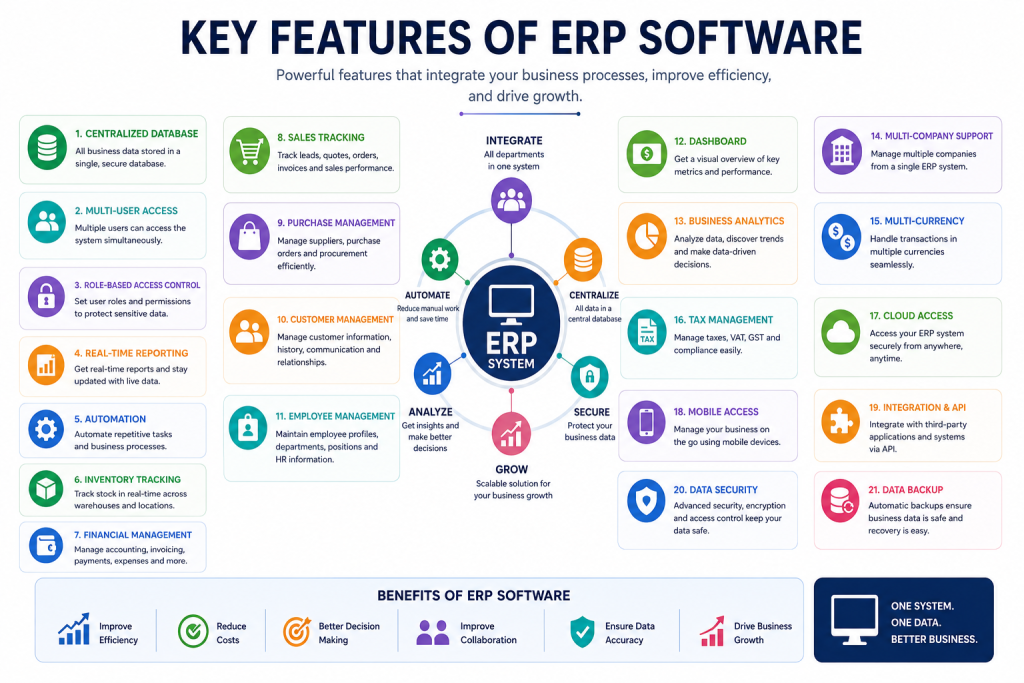
5. Key Features of ERP Software
Modern ERP Software combines multiple business functions into a single integrated platform. The right ERP system can help businesses centralize data, automate processes, improve operational visibility, and make better decisions.
Here are the most important ERP software features businesses should consider:
1. Centralized Database
ERP software stores business information in a centralized database. Sales, inventory, accounting, purchasing, customer, and employee data can be managed from a common system, reducing duplicate and inconsistent records.
2. Multi-User Access
Multiple employees and departments can use the ERP system simultaneously based on their assigned permissions. This allows teams to work together without maintaining separate systems.
3. Role-Based Access Control
Role-based access control allows businesses to determine which information and functions each user can access. For example, an accountant can access financial data while a salesperson may only access sales and customer information.
4. Real-Time Reporting
ERP systems can provide updated reports on sales, inventory, purchases, finances, and other business operations. Real-time reporting helps managers make faster, data-driven decisions.
5. Business Process Automation
ERP software can automate repetitive tasks such as invoice generation, stock updates, purchase workflows, notifications, and financial entries. Automation reduces manual work and improves process efficiency.
6. Inventory Tracking
Inventory management features help businesses track stock quantities, product movements, warehouses, purchases, sales, transfers, and adjustments. This improves inventory accuracy and reduces stock-related problems.
7. Financial Management
ERP financial management features can handle accounting, invoices, expenses, payments, receivables, payables, financial reports, and other financial activities within an integrated system.
8. Sales Tracking
Businesses can manage quotations, sales orders, customers, invoices, payments, discounts, and sales performance. Sales tracking provides better visibility into the complete sales process.
9. Purchase Management
Purchase management features help businesses manage suppliers, purchase orders, procurement, product receiving, vendor pricing, and purchasing activities from one system.
10. Customer Management
ERP software can store customer profiles, contact information, purchase history, communication records, and other customer-related data. This helps businesses manage customer relationships more effectively.
11. Employee Management
Employee management features allow businesses to organize employee profiles, attendance, leave, recruitment, departments, job positions, and other HR information.
12. Dashboard
ERP dashboards provide a visual overview of important business metrics such as sales, revenue, inventory, expenses, orders, and performance. Managers can quickly understand business performance from a centralized dashboard.
13. Business Analytics
Business analytics tools transform operational data into useful insights. Businesses can analyze sales trends, inventory performance, financial results, customer activity, and other key performance indicators.
14. Multi-Company Support
For businesses operating multiple companies or legal entities, multi-company ERP features allow different company operations to be managed within the same ERP environment while keeping relevant data separated.
15. Multi-Currency Support
Multi-currency functionality allows businesses to manage transactions in different currencies. This is particularly useful for importers, exporters, international businesses, and companies dealing with overseas customers or suppliers.
16. Tax Management
ERP software can help businesses manage applicable taxes, tax-related transactions, invoices, and financial records according to their business requirements and local regulations.
17. Cloud Access
Cloud-based ERP allows authorized users to access business information through an internet connection without depending on a single physical computer or office location.
18. Mobile Access
Mobile-friendly ERP systems allow business owners and employees to access selected business information and perform certain tasks using smartphones or tablets.
19. Integration & API
ERP integration and API capabilities allow the ERP system to connect with websites, eCommerce platforms, payment systems, marketplaces, CRM tools, accounting services, and other business applications.
20. Data Security
ERP systems can include user permissions, access controls, authentication, activity tracking, and other security mechanisms to protect sensitive business information from unauthorized access.
21. Data Backup
Regular data backups help protect important business information against accidental deletion, system failures, hardware problems, or other data-loss situations. A reliable backup strategy is an important part of ERP data management.
What Makes These ERP Features Important?
The real value of ERP software features comes from their integration. Instead of using separate systems for sales, inventory, accounting, HR, and reporting, businesses can connect these functions through one platform.
Centralized Data → Automation → Department Integration → Real-Time Information → Better Business Decisions
When selecting an ERP system, businesses should focus not only on the number of features but also on whether those features match their actual business processes, industry requirements, budget, and future growth plans.
6. Types of ERP Software
ERP software comes in different types based on how it is deployed, licensed, customized, and designed for specific business requirements. Choosing the right type of ERP software depends on factors such as business size, budget, security requirements, industry, scalability, and IT resources.
6.1 Cloud ERP
Cloud ERP is hosted on remote servers and accessed through the internet. Businesses do not need to maintain the ERP infrastructure on their own premises.
Key benefits:
- Access from different locations
- Lower upfront infrastructure costs
- Easier updates and maintenance
- Flexible scalability
- Suitable for distributed teams
Cloud ERP is often a practical option for small, medium, and growing businesses.
6.2 On-Premise ERP
On-Premise ERP is installed and operated on a company’s own servers and infrastructure. The business is responsible for hardware, maintenance, security, updates, and system management.
Key benefits:
- Greater control over infrastructure
- More control over data storage
- Extensive customization options
- Suitable for businesses with dedicated IT teams
On-premise ERP can be suitable for organizations with specific infrastructure, security, or compliance requirements.
6.3 Hybrid ERP
Hybrid ERP combines cloud-based and on-premise ERP components. A business can keep certain systems or data on its own infrastructure while using cloud services for other operations.
This approach can provide flexibility for businesses transitioning from traditional systems to cloud-based ERP.
6.4 Open Source ERP
Open Source ERP provides access to the software’s source code, depending on the specific license. Businesses or developers can customize the system according to their requirements.
Common advantages:
- Greater customization flexibility
- Potentially lower software licensing costs
- Large developer communities for some platforms
- Ability to extend functionality
However, businesses should also consider implementation, hosting, customization, maintenance, and technical support costs.
6.5 Proprietary or Commercial ERP
Proprietary ERP is developed and controlled by a software vendor. Businesses generally purchase a license or subscription to use the system.
These ERP solutions often provide vendor-supported updates, documentation, professional implementation services, and technical support.
They can be suitable for organizations that prefer a structured vendor-managed solution.
6.6 Industry-Specific ERP
Industry-specific ERP software is designed around the workflows and requirements of a particular industry.
Examples include ERP solutions for:
- Manufacturing
- Retail
- Healthcare
- Education
- Construction
- Agriculture
- Distribution
- eCommerce
Industry-specific ERP can reduce the need for extensive customization because many industry-related processes may already be supported.
6.7 Small Business ERP
Small Business ERP is designed for organizations with relatively simple operations and limited users. These systems typically focus on essential functions such as accounting, sales, inventory, purchasing, and customer management.
A small business should prioritize ease of use, affordability, essential features, and scalability when choosing an ERP system.
6.8 Enterprise ERP
Enterprise ERP is designed for large organizations with complex operations, multiple departments, locations, companies, or business units.
Enterprise ERP may include advanced capabilities such as:
- Multi-company management
- Advanced financial management
- Supply chain management
- Manufacturing
- Business intelligence
- Advanced reporting
- Complex user permissions
- Large-scale integrations
Cloud ERP vs On-Premise ERP
One of the most important decisions when selecting ERP software is choosing between cloud and on-premise deployment.
| Factor | Cloud ERP | On-Premise ERP |
|---|---|---|
| Deployment | Hosted by a cloud provider | Installed on company infrastructure |
| Accessibility | Accessible through the internet | Usually accessed through company infrastructure |
| Initial Infrastructure Cost | Generally lower | Generally higher |
| Maintenance | Usually handled largely by provider | Managed by the business or IT team |
| Updates | Typically provided through the service | Managed by the organization |
| Scalability | Usually easier to scale | May require additional infrastructure |
| IT Requirement | Lower infrastructure management | Requires greater internal IT management |
| Customization | Depends on the provider/platform | Often offers extensive control |
| Data Control | Managed according to provider setup | Greater direct infrastructure control |
| Best For | Growing and distributed businesses | Organizations needing direct infrastructure control |
Which Type of ERP Software Is Right for Your Business?
There is no single ERP deployment model that is best for every business. A growing SME may prefer Cloud ERP because of its accessibility and lower infrastructure requirements, while a large organization with specialized infrastructure needs may prefer On-Premise or Hybrid ERP.
The right choice should be based on your business requirements, budget, security needs, customization requirements, IT capabilities, and long-term growth plans.
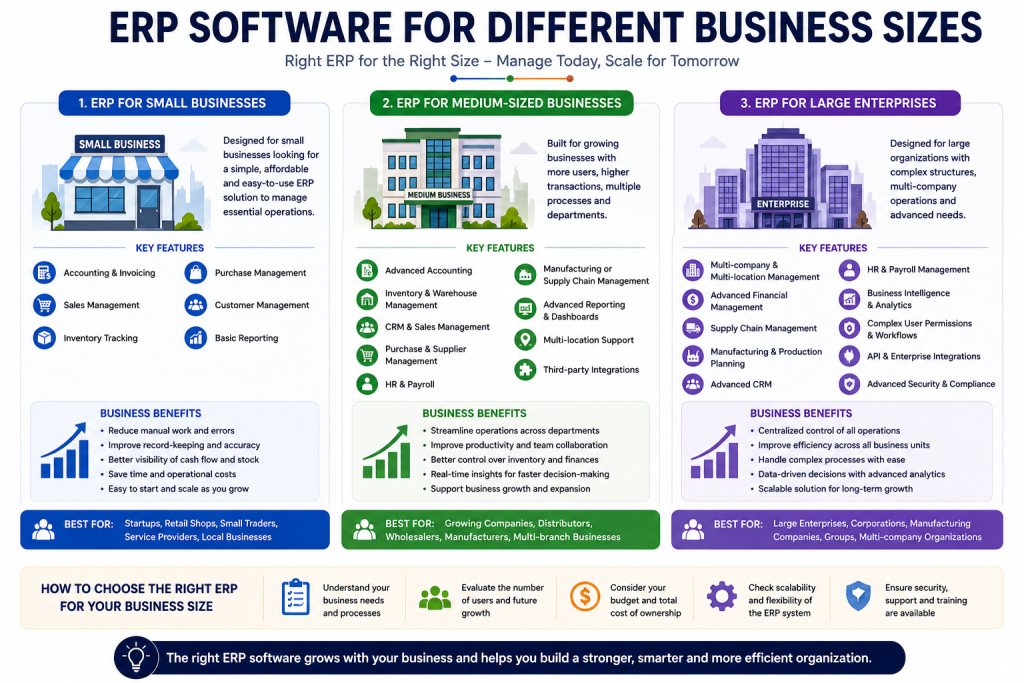
7. ERP Software for Different Business Sizes
The ERP requirements of a business depend heavily on its size, operational complexity, number of users, and growth plans. A small business may need only essential modules, while a large enterprise may require advanced automation, multiple companies, locations, and complex reporting.
Choosing ERP Software based on business size helps organizations avoid unnecessary costs while ensuring the system can support future growth.
7.1 ERP for Small Businesses
ERP for small businesses typically focuses on essential business operations such as accounting, sales, inventory, purchasing, and customer management.
Small businesses often need an ERP system that is affordable, easy to use, quick to implement, and capable of scaling as the business grows.
Key requirements:
- Accounting and invoicing
- Sales management
- Inventory tracking
- Purchase management
- Customer management
- Basic reporting
- User access control
Business benefits:
A suitable ERP system can reduce manual work, improve record-keeping, provide better business visibility, and help small businesses manage growth more efficiently.
7.2 ERP for Medium-Sized Businesses
ERP for medium-sized businesses usually requires more advanced functionality because operations may involve larger teams, multiple warehouses, higher transaction volumes, and more complex workflows.
Medium-sized businesses may need integrated modules for finance, sales, purchasing, inventory, CRM, HR, manufacturing, and reporting.
Key requirements:
- Advanced accounting
- Inventory and warehouse management
- CRM and sales management
- Purchase and supplier management
- HR and payroll
- Manufacturing or supply chain management
- Advanced reporting and dashboards
- Multi-location support
- Third-party integrations
Business benefits:
ERP can help medium-sized businesses connect departments, automate workflows, improve operational control, and make data-driven decisions.
7.3 ERP for Large Enterprises
ERP for large enterprises is designed to handle complex business operations across multiple departments, locations, branches, or companies.
Large organizations often require highly scalable ERP solutions with advanced financial management, supply chain management, manufacturing, analytics, security, and integration capabilities.
Key requirements:
- Multi-company and multi-location management
- Advanced financial management
- Supply chain management
- Manufacturing and production planning
- Advanced CRM
- HR and payroll
- Business intelligence and analytics
- Complex user permissions
- API and enterprise integrations
- Advanced security and compliance
Business benefits:
Enterprise ERP can provide centralized control, improve coordination across business units, automate complex processes, and support large-scale business growth.
Which ERP Is Right for Your Business Size?
There is no single ERP solution that is ideal for every business. The right choice depends on your number of users, business processes, required modules, transaction volume, budget, customization needs, and future growth plans.
A good ERP system should solve your current operational problems while providing enough flexibility to support your business as it grows.
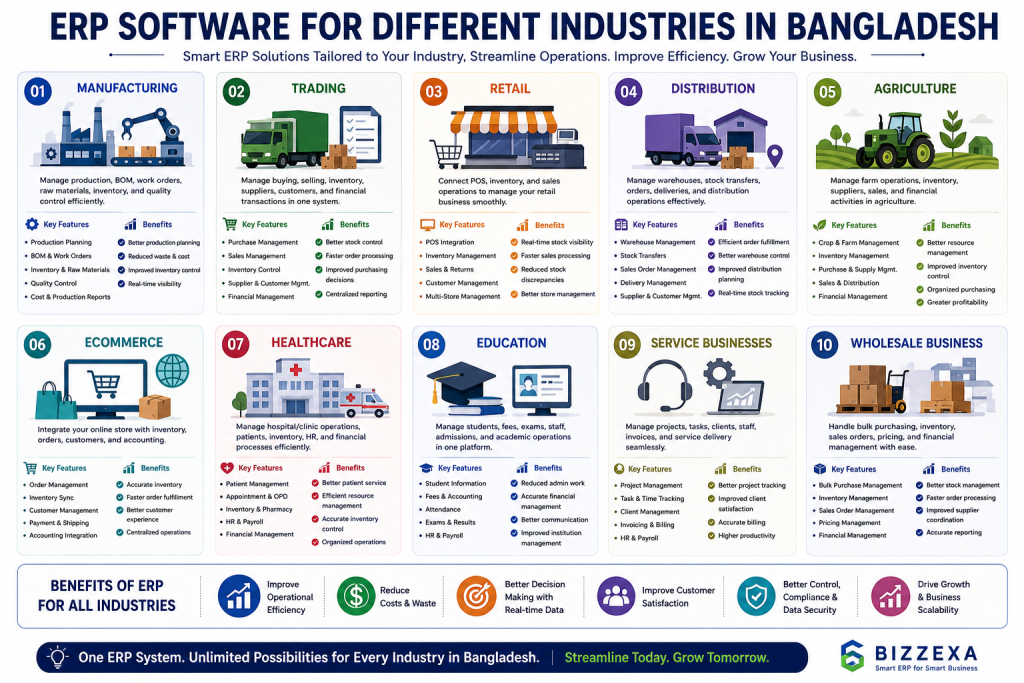
8. ERP Software for Different Industries in Bangladesh
Different industries have different workflows, operational challenges, and reporting requirements. Therefore, the best ERP Software in Bangladesh should be flexible enough to support the specific needs of each business.
Here are some of the major industries that can benefit from ERP solutions.
8.1 ERP Software for Manufacturing
Manufacturing ERP helps factories and production businesses manage raw materials, production processes, inventory, purchasing, sales, and accounting.
Key needs: Bill of materials (BOM), production planning, work orders, inventory management, quality control, procurement, and production reporting.
Benefits: Better production planning, reduced waste, improved inventory control, and greater visibility across manufacturing operations.
8.2 ERP Software for Trading Businesses
ERP Software for trading businesses helps manage purchasing, sales, inventory, suppliers, customers, and financial transactions.
It is particularly useful for businesses that buy and sell products without manufacturing them.
Benefits: Better stock control, faster order processing, improved purchasing decisions, and centralized business reporting.
Trading businesses need efficient inventory management, purchasing, sales, accounting, order processing, and supply chain coordination to operate smoothly. To understand how ERP can improve these processes, explore our detailed guide to ERP for Trading Business.
8.3 ERP Software for Retail
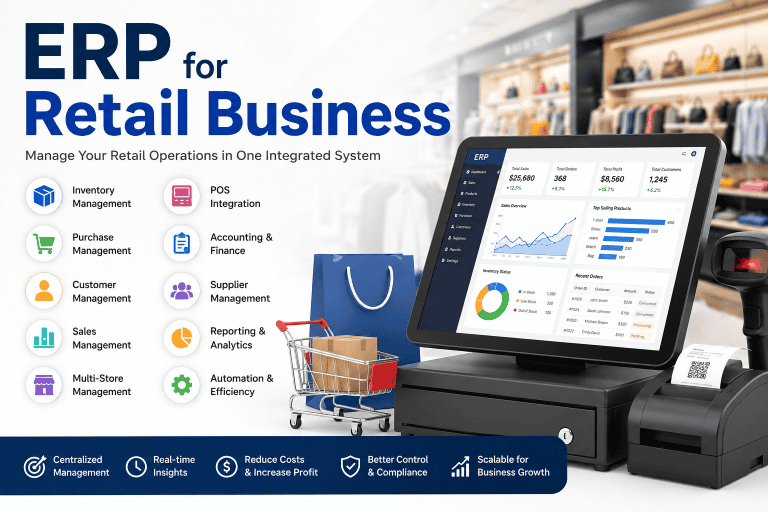
Retail ERP connects point-of-sale (POS), inventory, purchasing, sales, customers, and accounting operations.
Retail businesses can use ERP to manage multiple stores, product variations, stock movements, sales transactions, and customer information.
Benefits: Real-time inventory visibility, faster sales processing, reduced stock discrepancies, and improved store management.Retail businesses need efficient inventory control, sales management, purchasing, customer management, and real-time reporting to operate smoothly. Learn how ERP software can help retailers streamline these processes in our detailed guide to ERP for Retail Business.
8.4 ERP Software for Distribution
Distribution ERP is designed for wholesalers, distributors, and businesses managing large volumes of products across warehouses and delivery channels.
Key needs: Warehouse management, stock transfers, sales orders, purchasing, delivery management, supplier management, and customer accounts.
Benefits: Better warehouse control, efficient order fulfillment, improved distribution planning, and real-time stock visibility.
8.5 ERP Software for Agriculture
Agriculture ERP helps agricultural businesses manage farming operations, inventory, purchasing, sales, suppliers, and financial activities.
It can be useful for agricultural suppliers, agro businesses, farms, and businesses involved in agricultural product distribution.
Benefits: Better resource management, improved inventory control, organized purchasing, and greater operational visibility.
8.6 ERP Software for eCommerce
eCommerce ERP connects online sales with inventory, purchasing, accounting, customer management, and order fulfillment.
An integrated ERP system can help businesses synchronize online orders and inventory while reducing manual order processing.
Benefits: Better order management, accurate inventory information, faster fulfillment, and centralized eCommerce operations.
8.7 ERP Software for Healthcare
Healthcare ERP helps healthcare organizations manage administrative, financial, inventory, purchasing, HR, and operational processes.
Hospitals, clinics, diagnostic centers, and healthcare businesses may require specialized workflows and appropriate access controls.
Benefits: Better resource management, organized financial operations, improved inventory control, and centralized administrative information.
8.8 ERP Software for Education
Education ERP helps schools, colleges, training centers, and educational organizations manage administrative and financial operations.
Key needs: Student information, fees, accounting, employee management, attendance, admissions, and reporting.
Benefits: Reduced administrative workload, centralized student and financial information, and improved institutional management.
8.9 ERP Software for Service Businesses
ERP for service businesses helps companies manage customers, projects, employees, invoices, expenses, tasks, and service delivery.
It can be useful for consulting firms, agencies, IT companies, maintenance providers, and professional service businesses.
Benefits: Better project tracking, improved customer management, accurate billing, and greater visibility into business performance.
8.10 ERP Software for Wholesale Businesses
Wholesale ERP helps wholesalers manage large-volume purchasing, inventory, sales orders, customers, suppliers, pricing, and financial transactions.
Wholesale businesses often need strong inventory and order management because they handle multiple products and high transaction volumes.
Benefits: Better stock management, faster order processing, improved supplier coordination, and more accurate sales and financial reporting.
Choosing ERP Based on Your Industry
The right ERP Software in Bangladesh should match the actual workflow of your industry rather than simply offering a large number of features. Businesses should consider their products, customers, inventory, departments, transaction volume, reporting requirements, and future growth before selecting an ERP solution.
A flexible ERP platform can also support multiple industries and be customized to match specific business processes.
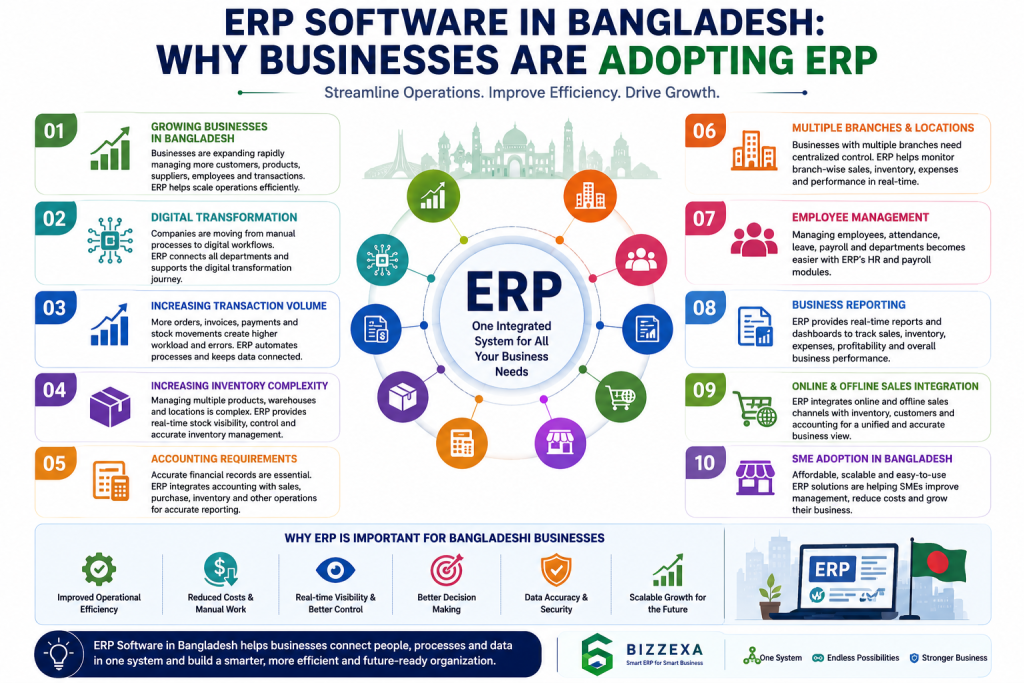
9. ERP Software in Bangladesh: Why Businesses Are Adopting ERP
The demand for ERP Software in Bangladesh is increasing as businesses become more digital, competitive, and operationally complex. Companies that once relied on Excel spreadsheets, paper records, and separate software are increasingly looking for integrated systems to manage their growing operations.
Growing Businesses in Bangladesh
As Bangladeshi businesses grow, they handle more customers, products, suppliers, employees, transactions, and financial activities. Managing this increasing volume of information manually becomes difficult and creates a need for centralized business management software.
Digital Transformation
Businesses are moving from manual processes toward digital workflows. ERP software in Bangladesh supports this digital transformation by connecting sales, inventory, accounting, purchasing, HR, and other business operations within one system.
Increasing Transaction Volume
Higher sales and purchase volumes mean more invoices, orders, payments, stock movements, and financial transactions. Manual data entry becomes time-consuming and increases the risk of errors.
ERP can automate and organize these transactions while keeping relevant business data connected.
Increasing Inventory Complexity
Businesses dealing with hundreds or thousands of products need accurate information about stock levels, warehouses, purchases, sales, returns, and product movements.
ERP inventory management helps businesses maintain better stock visibility and reduce inventory discrepancies.
Accounting and Financial Requirements
Businesses need accurate records of sales, purchases, expenses, payments, receivables, and payables. When financial information is maintained separately from other operations, reporting can become slower and more complicated.
An integrated ERP system can connect accounting with sales, purchasing, inventory, and other business processes.
Multiple Branches and Locations
Businesses with multiple branches, stores, warehouses, or offices need a centralized way to monitor operations.
ERP software can help management track branch-level sales, inventory, expenses, and performance while maintaining centralized business visibility.
Employee Management
As businesses hire more employees, managing employee information, attendance, leave, payroll, departments, and responsibilities becomes more complex.
ERP systems with HR and payroll modules can organize employee-related processes and reduce administrative workload.
Business Reporting and Analytics
Business owners need reliable information to understand sales, inventory, expenses, profitability, and operational performance.
ERP reporting and analytics can provide dashboards and reports that help management make faster, data-driven decisions.
Online and Offline Sales Integration
Many businesses now sell through physical stores as well as websites, social media, marketplaces, and other online channels.
Connecting online and offline sales with inventory, customers, and accounting can reduce duplicate work and provide a more consistent view of business operations.
ERP Adoption Among SMEs in Bangladesh
Small and medium-sized enterprises (SMEs) represent a significant part of the business ecosystem in Bangladesh. As SMEs expand, many face challenges related to inventory management, accounting, customer management, sales tracking, and operational control.
Modern ERP solutions are becoming more accessible to SMEs because businesses can choose cloud-based systems, modular solutions, and scalable platforms according to their requirements and budget.
Why ERP Is Becoming Important for Bangladeshi Businesses
The shift toward ERP is driven by a simple business need: better control over increasingly complex operations.
Businesses adopting ERP can bring together:
Sales + Inventory + Purchase + Accounting + HR + Customers + Reporting
into a connected business management environment.
For growing companies, the right ERP Software in Bangladesh can provide a stronger foundation for automation, operational efficiency, real-time visibility, and long-term business growth.
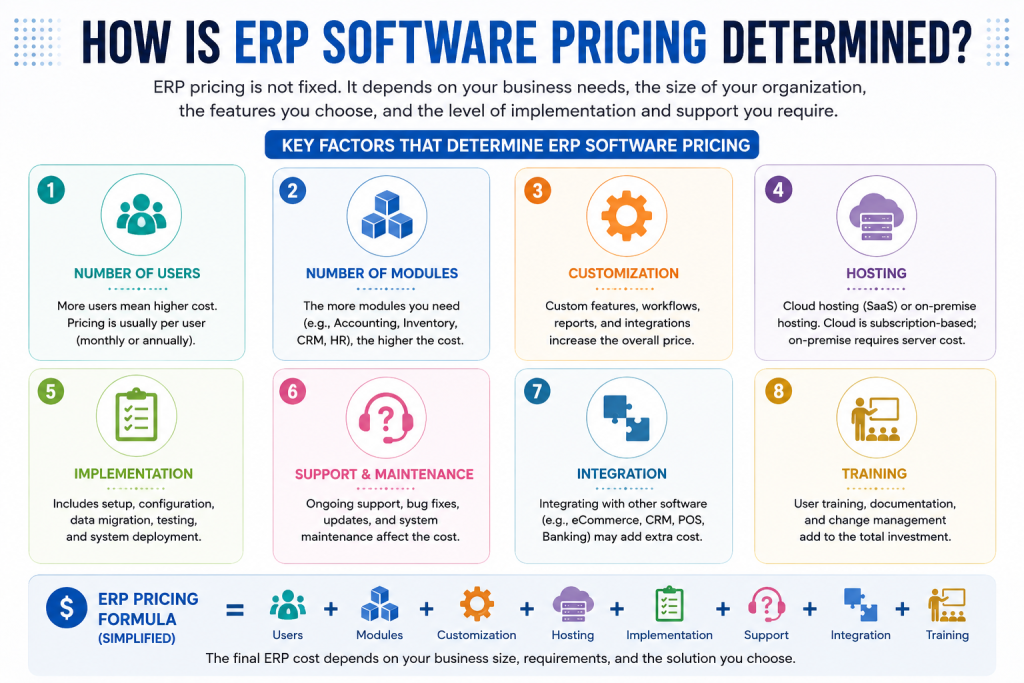
10. ERP Software Pricing in Bangladesh
ERP software pricing in Bangladesh varies depending on the size of the business, number of users, required modules, customization, implementation, hosting, and ongoing support. There is no single fixed price for an ERP system because different businesses have different operational requirements.
For businesses comparing ERP software pricing in Bangladesh, the most important factor is not simply the software license price. The total cost usually includes software, implementation, customization, training, hosting, integrations, and long-term maintenance.
ERP software costs can vary depending on the number of users, modules, customization, implementation, hosting, and ongoing support. For a detailed breakdown, see our guide to ERP software pricing in Bangladesh.
How Is ERP Software Pricing Determined?
Several factors influence the total cost of an ERP solution in Bangladesh.
1. Number of Users
The number of employees or users who need access to the ERP system can significantly affect pricing. Some ERP providers charge based on the number of users, while others offer pricing based on applications, features, or deployment models.
A small business with 5–10 users may require a much smaller investment than a company with 50 or 100+ users.
2. Number of ERP Modules
ERP systems are usually built around different business modules. Common modules include:
- Accounting and Finance
- Sales and CRM
- Purchase Management
- Inventory Management
- Manufacturing
- Human Resources
- Payroll
- Point of Sale (POS)
- Project Management
- Website and eCommerce
- Business Reporting
The more modules a business needs, the more complex the implementation can become. Businesses should select modules based on their actual operational requirements rather than paying for unnecessary features.
3. Customization
Standard ERP functionality may not always match the specific processes of a Bangladeshi business. Customization may therefore be required for workflows, reports, approval systems, dashboards, invoices, taxation requirements, inventory processes, or industry-specific operations.
The amount of customization required is one of the major factors affecting the overall ERP implementation cost in Bangladesh.
4. Hosting
ERP software can be deployed using different hosting options, including:
- Cloud hosting
- Dedicated servers
- VPS hosting
- On-premise infrastructure
Cloud-based ERP solutions may reduce the need for businesses to purchase and maintain their own hardware. However, hosting fees can become part of the recurring ERP cost.
5. ERP Implementation
ERP implementation involves configuring the system and preparing it for actual business operations. Depending on the project, implementation may include:
- Business process analysis
- ERP configuration
- Data migration
- User setup
- Workflow configuration
- Accounting setup
- Inventory configuration
- Testing
- Deployment
- Go-live support
A more complex ERP implementation generally requires a larger budget.
6. Support and Maintenance
ERP software requires ongoing technical support after deployment. Businesses may need assistance with system updates, troubleshooting, database management, security, performance optimization, and new requirements.
Therefore, when evaluating ERP software cost in Bangladesh, businesses should consider both the initial investment and recurring maintenance expenses.
7. Third-Party Integrations
Many businesses need their ERP system to communicate with other platforms. Common integrations include:
- Payment gateways
- eCommerce platforms
- SMS services
- Email services
- Banking systems
- Shipping and delivery platforms
- POS systems
- Government or third-party services
The complexity and number of integrations can increase the overall ERP project cost.
8. Employee Training
ERP implementation is not complete when the software is installed. Employees need to understand how to use the system correctly.
Training may cover:
- Accounting operations
- Sales processes
- Purchase management
- Inventory management
- HR and payroll
- Reporting
- User permissions
- Business workflows
Professional training can help businesses reduce errors and improve ERP adoption.
Estimated ERP Pricing Model in Bangladesh
The following table provides a general framework for understanding ERP pricing based on business size. Actual pricing can vary significantly depending on the software, modules, number of users, customization, implementation requirements, and service provider.
| Business Type | Typical ERP Requirement | Main Pricing Factors |
| Small Business | Basic accounting, sales, purchase, inventory, and reporting | Number of users + selected modules |
| Medium Business | Integrated accounting, inventory, sales, purchase, HR, CRM, and reporting | Users + modules + customization |
| Large Business | Advanced ERP with multiple departments, branches, automation, dashboards, and integrations | Implementation + customization + integrations + support |
What Should Businesses Consider Before Choosing an ERP?
Instead of choosing an ERP system based only on the lowest price, businesses should evaluate the total cost of ownership (TCO). A low-cost ERP may become expensive if it requires extensive customization, has poor support, or cannot scale with business growth.
Before purchasing ERP software in Bangladesh, businesses should compare:
- Initial software cost
- Number of users included
- Available ERP modules
- Customization requirements
- Hosting expenses
- Implementation fees
- Data migration costs
- Integration costs
- Employee training
- Annual support and maintenance
- Future scalability
For small and growing businesses, a modular ERP approach can be more cost-effective because companies can start with essential modules and add additional functionality as their operations expand.
Final Thoughts on ERP Software Pricing in Bangladesh
The cost of ERP software in Bangladesh depends largely on the business’s size, operational complexity, number of users, required modules, and level of customization. A basic ERP system for a small business can have very different pricing from a fully customized enterprise solution with multiple branches and integrations.
Therefore, businesses should focus on value, scalability, implementation quality, and long-term support rather than choosing an ERP system based solely on its initial price.
If you are comparing ERP solutions, creating a clear list of your required modules, users, integrations, and business processes is the best starting point for estimating your actual ERP investment.
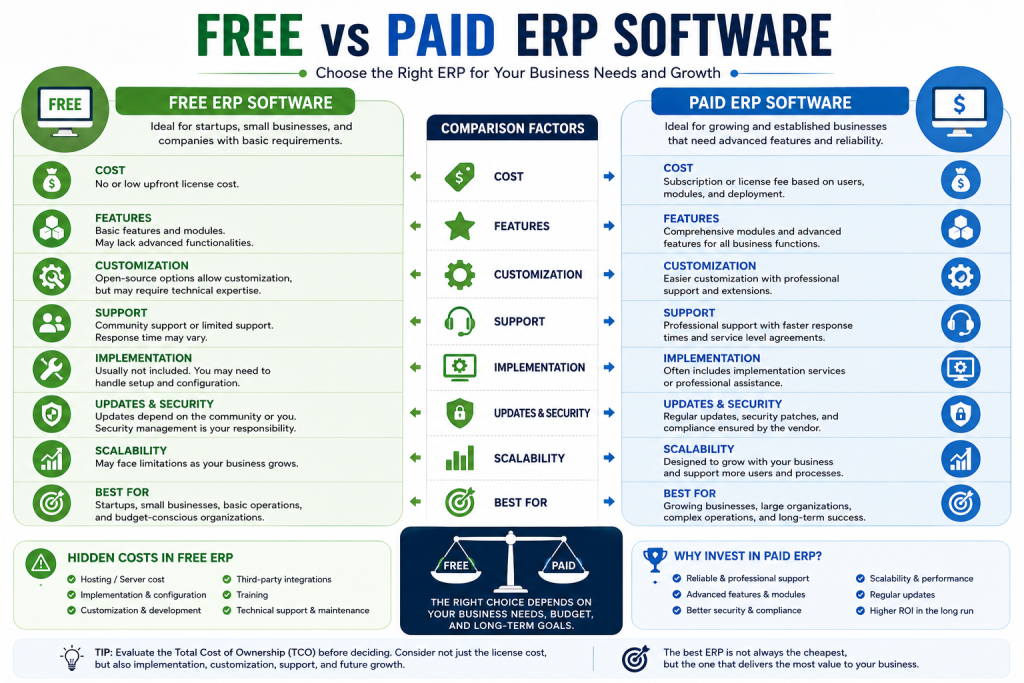
11.Free vs Paid ERP Software
Choosing between free and paid ERP software is an important decision for businesses in Bangladesh. While free ERP solutions can reduce initial software costs, they may not always provide the features, customization, support, security, and scalability required for a growing business.
The right choice depends on factors such as business size, number of users, required ERP modules, customization needs, implementation requirements, integrations, and long-term support.
What Does Free ERP Software Mean?
Free ERP software generally refers to an ERP solution that can be used without paying a recurring software license fee. However, free does not always mean completely cost-free.
Some free ERP solutions are open-source, while others offer limited features under a free plan. Businesses may still need to pay for hosting, implementation, customization, training, maintenance, integrations, and technical support.
For example, a small business may start with a free ERP platform but later incur costs when it needs additional modules, custom reports, third-party integrations, or professional support.
Therefore, businesses should evaluate the total cost of ownership (TCO) rather than looking only at the software license price.
Open-Source ERP Software
Open-source ERP software provides access to the software’s source code, allowing businesses or developers to modify and customize the system according to their requirements.
Open-source ERP can be particularly attractive for businesses that need flexibility and want greater control over their ERP system.
Common advantages include:
- Lower or no software licensing costs
- Greater customization flexibility
- Access to source code
- Ability to host the ERP on your own server
- Large developer communities
- Greater control over data and infrastructure
- Ability to integrate with other business applications
However, open-source ERP does not necessarily mean that the entire ERP implementation is free.
Businesses may still need to pay for:
- Server or cloud hosting
- ERP implementation
- Custom development
- Data migration
- Third-party integrations
- Employee training
- Technical support
- Security updates
- Maintenance
For a small business with basic requirements, an open-source ERP can be a cost-effective option. For a larger organization, professional implementation and ongoing maintenance may still represent a significant investment.
Free ERP Trial vs Free ERP Software
A free trial and free ERP software are not the same thing.
A free ERP trial usually provides temporary access to a paid ERP system. The business can test the software before purchasing a subscription or license.
A free ERP version, on the other hand, may provide permanent access to certain features without a software license fee.
For example, a vendor may offer:
- 7-day free trial
- 14-day free trial
- 30-day free trial
- Limited free plan
- Community edition
- Free self-hosted version
Businesses should carefully check what happens when the trial period ends. Some vendors automatically require a paid subscription, while others restrict access to certain modules or features.
Tip: Before selecting an ERP based on a free trial, test the features that your business will actually use, including inventory, accounting, sales, purchasing, reporting, user permissions, and integrations.
Paid ERP Software
Paid ERP software typically provides a more comprehensive business management solution with professional support, regular updates, implementation services, and additional features.
Depending on the vendor, ERP pricing may be based on:
- Number of users
- Number of modules
- Subscription period
- Hosting
- Business size
- Customization requirements
- Implementation services
- Support package
- Integrations
Paid ERP software can be a better option for businesses that require reliable support, advanced features, security, scalability, and professional implementation.
For example, a growing trading or manufacturing company may require accounting, inventory, purchasing, sales, CRM, manufacturing, HR, reporting, and multi-branch functionality. In such cases, choosing a paid ERP solution may provide better long-term value than relying on a basic free system.
Hidden Costs of Free ERP Software
One of the biggest mistakes businesses make is assuming that free ERP means zero cost.
The software license may be free, but other costs can increase the overall ERP investment.
1. Hosting Costs
Self-hosted ERP software requires a server or cloud infrastructure.
Depending on the size of the business, hosting may include:
- VPS hosting
- Cloud server
- Database server
- Backup storage
- SSL and security services
- Server monitoring
2. Implementation Costs
Installing ERP software is only the beginning. Businesses need to configure the system according to their business processes.
Implementation may include:
- Business process analysis
- ERP configuration
- User setup
- Accounting configuration
- Inventory configuration
- Workflow configuration
- Data migration
- Testing
- Deployment
3. Customization Costs
A free ERP may not perfectly match a company’s existing business processes.
Businesses may need custom:
- Reports
- Forms
- Workflows
- Dashboards
- Fields
- Modules
- Approval processes
- Invoices
- Integrations
Customization is often one of the largest costs associated with ERP implementation.
4. Support Costs
Free ERP software may not include professional technical support.
Businesses may need to pay developers or ERP consultants for:
- Bug fixing
- System configuration
- Troubleshooting
- Updates
- Security issues
- Performance optimization
- User support
5. Training Costs
Employees need to understand how to use the ERP system correctly.
Training may be required for:
- Sales employees
- Accounts teams
- Inventory managers
- Purchase teams
- HR staff
- Business owners
- Administrators
Poor training can reduce ERP adoption and create operational problems.
6. Integration Costs
Modern businesses often use multiple systems, such as payment gateways, eCommerce platforms, POS systems, banking software, CRM tools, shipping platforms, and other business applications.
Connecting these systems to an ERP may require additional development and integration costs.
Customization Costs: Free vs Paid ERP
Customization is an important factor when comparing ERP software.
A free ERP may provide a strong foundation, but businesses often need modifications to match their specific workflows.
Customization costs can depend on:
- Number of custom features
- Development complexity
- Number of ERP modules
- Third-party integrations
- Custom reports
- Business-specific workflows
- Number of users
- Developer or implementation partner fees
A business should avoid excessive customization unless it provides clear business value.
Best practice: First configure the ERP using its standard functionality. Customize only when the standard system cannot reasonably support an important business requirement.
ERP Support and Maintenance Costs
ERP software requires ongoing maintenance after implementation.
Support and maintenance may include:
- Software updates
- Security patches
- Bug fixes
- Database maintenance
- Server monitoring
- Backup management
- Performance optimization
- Technical support
- Custom module maintenance
Paid ERP providers may include some of these services in their subscription or support packages, while free and open-source ERP users may need to arrange them separately.
This is why businesses should evaluate the long-term cost of ERP ownership, not just the initial purchase price.
Free vs Paid ERP Software: Comparison
| Factor | Free ERP | Paid ERP |
| Software License | Usually free | Paid |
| Initial Cost | Low | Medium to high |
| Hosting | May be separate | Often included or optional |
| Features | May be limited | Usually more comprehensive |
| Customization | Usually possible | Usually available |
| Professional Support | May cost extra | Often available |
| Implementation | Usually separate | May be included or charged separately |
| Training | Usually separate | Often available |
| Integrations | May require development | Often supported |
| Security & Updates | Depends on solution | Usually managed by vendor |
| Scalability | Depends on platform | Usually designed for growth |
| Best For | Small businesses, testing, technical users | Growing and established businesses |
| Long-Term Cost | Can increase with customization and support | More predictable in many cases |
Which Is Better: Free or Paid ERP Software?
There is no universal answer because the best ERP depends on the business’s requirements and budget.
Free ERP may be better if:
- You are a small business
- Your ERP requirements are basic
- You have technical resources
- You want to minimize initial costs
- You are comfortable managing hosting
- You do not require extensive customization
- You want to test ERP before making a major investment
Paid ERP may be better if:
- Your business is growing rapidly
- You need multiple ERP modules
- You require professional implementation
- You need reliable technical support
- You have multiple branches or departments
- You require advanced reporting
- You need integrations with other systems
- ERP downtime could significantly affect your business
The Bottom Line
The cheapest ERP software is not necessarily the most cost-effective ERP software.
Businesses should compare total cost of ownership, including software, hosting, implementation, customization, training, support, maintenance, and integration costs.
For a small business with simple requirements, a free or open-source ERP can be an excellent starting point. However, businesses with complex operations may benefit more from a paid ERP solution that provides professional support, scalability, security, and a predictable implementation process.
When comparing ERP solutions in Bangladesh, businesses should evaluate the total investment and expected business value rather than choosing an ERP simply because it has a free version.
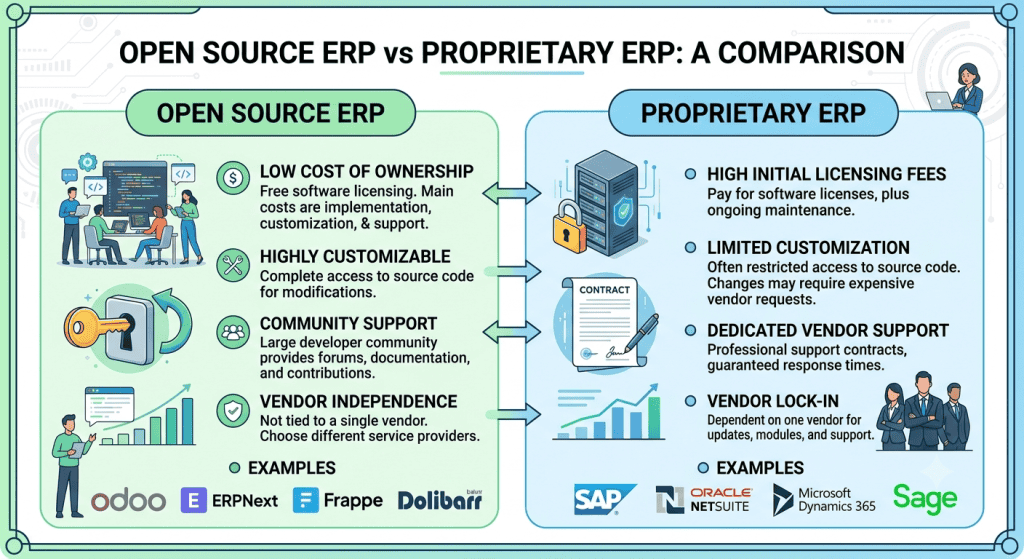
12.Open Source ERP vs Proprietary ERP
When choosing an ERP system, businesses often compare open source ERP vs proprietary ERP. Both options can help manage accounting, inventory, sales, purchasing, HR, manufacturing, and other business operations, but they differ significantly in cost, flexibility, support, and vendor dependency.
Open Source ERP
Open source ERP software provides access to the source code, allowing businesses and developers to modify and customize the system according to their requirements. It can offer greater flexibility and control, especially for businesses with specific workflows or integration needs.
Proprietary ERP
Proprietary ERP software is owned and controlled by a software vendor. Businesses typically pay a subscription or license fee to use the system. The vendor manages the core software, updates, security, and usually provides professional technical support.
Open Source ERP vs Proprietary ERP Comparison
| Factor | Open Source ERP | Proprietary ERP |
|---|---|---|
| Cost | Usually lower licensing cost, but implementation and maintenance may add costs | Subscription or license fees are usually required |
| Customization | Highly flexible and customizable | Customization depends on vendor capabilities |
| Source Code | Source code is generally accessible | Source code is controlled by the vendor |
| Security | Security depends on configuration, updates, and maintenance | Vendor typically manages security updates and patches |
| Support | Community support or third-party professional support | Usually includes vendor or partner support |
| Scalability | Can scale with proper infrastructure and development | Usually designed for structured business growth |
| Vendor Dependency | Lower vendor lock-in; more implementation options | Higher dependency on the software vendor |
| Maintenance | Business or implementation partner may manage maintenance | Vendor generally manages core software maintenance |
Which ERP Model Is Better?
Open source ERP is often suitable for businesses that need flexibility, customization, and greater control over their software environment. Proprietary ERP may be more suitable for businesses that prefer predictable vendor support, managed updates, and a ready-to-use business management platform.
The best choice depends on your business size, budget, customization requirements, technical resources, and long-term growth plans. Instead of comparing only the initial software price, businesses should evaluate the total cost of ownership and the level of control and support they require.
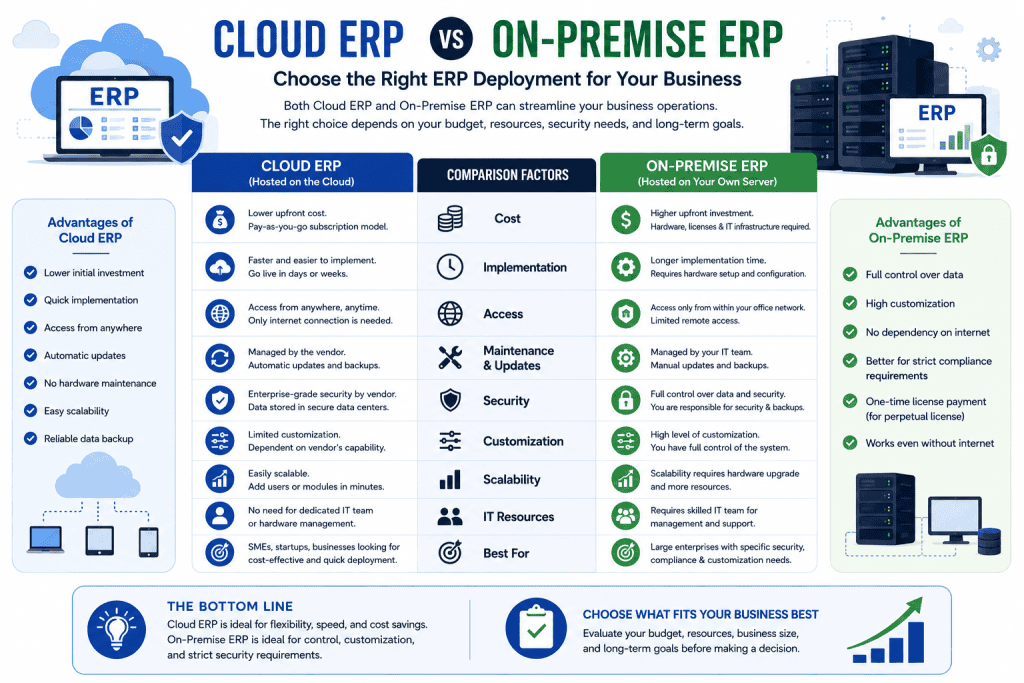
13.Cloud ERP vs On-Premise ERP
When choosing ERP software, businesses must decide whether to use a Cloud ERP or an On-Premise ERP system. The main difference is where the ERP software and business data are hosted.
Cloud ERP is hosted on the vendor’s or a cloud provider’s servers and accessed through the internet. On-Premise ERP is installed and managed on the company’s own servers and infrastructure.
Businesses can choose between different ERP deployment models depending on their budget, infrastructure, security requirements, and business needs. To understand the key differences, advantages, costs, and limitations of each option, read our detailed guide on Cloud ERP vs On-Premise ERP.
Cloud ERP vs On-Premise ERP: Comparison
| Factor | Cloud ERP | On-Premise ERP |
|---|---|---|
| Initial Cost | Lower initial investment; usually subscription-based | Higher initial investment for servers, licenses, and infrastructure |
| Hosting | Managed by the ERP provider or cloud hosting provider | Managed by the business on its own servers |
| Maintenance | Mostly handled by the provider | Business is responsible for maintenance |
| Accessibility | Accessible from anywhere with an internet connection | Usually accessed through the company’s internal network or configured remote access |
| Scalability | Easy to scale users, storage, and resources as the business grows | Scaling may require additional hardware and infrastructure |
| Security | Security, backups, and infrastructure are often managed by the provider | Business has greater control but must manage security and backups |
| Updates | Usually automatic or managed by the provider | Updates must be installed and managed by the business |
Which ERP Deployment Model Is Better?
Cloud ERP is generally suitable for businesses that want lower upfront costs, remote accessibility, faster deployment, and easier scalability. On-Premise ERP may be preferable for organizations that require greater control over infrastructure, data, and system configuration.
The best choice depends on the company’s budget, security requirements, IT resources, business size, customization needs, and long-term growth plans.
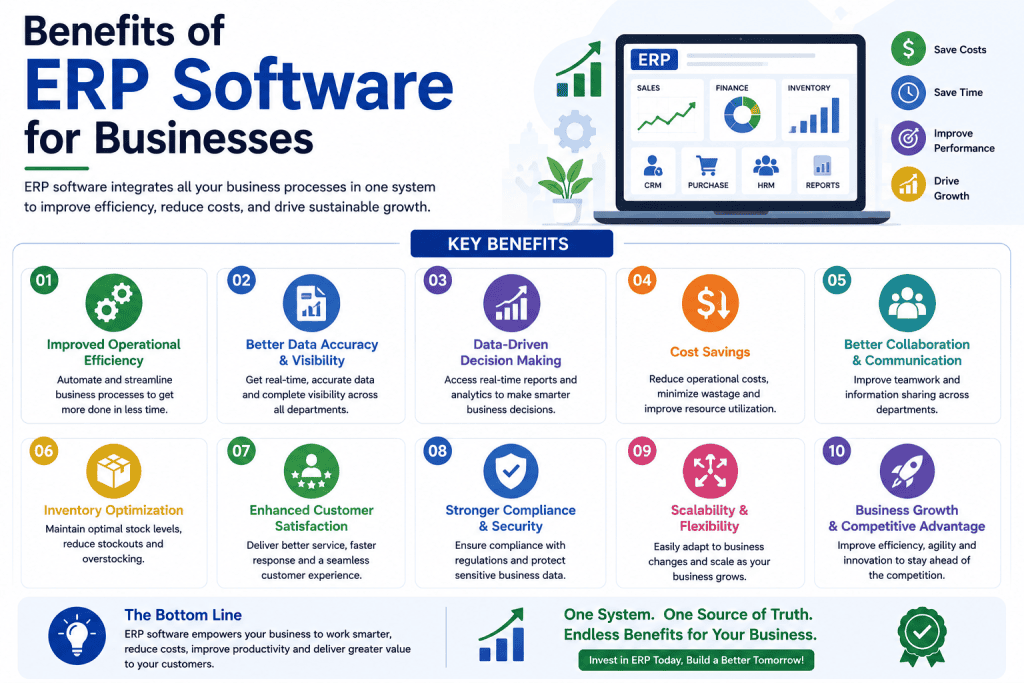
14.Benefits of ERP Software for Businesses
ERP software helps businesses manage core operations from a centralized system. By connecting departments such as sales, accounting, inventory, purchasing, HR, and operations, ERP can improve efficiency, reduce errors, and provide better visibility across the organization.
Here are the key benefits of ERP software for modern businesses:
1. Reduce Manual Work
ERP automates repetitive processes such as data entry, invoicing, inventory updates, purchase orders, and financial calculations. This reduces paperwork and allows employees to focus on higher-value tasks.
2. Improve Productivity
By bringing business processes into one integrated platform, ERP reduces duplicate work and makes information easier to access. Employees can complete tasks faster and work more efficiently.
3. Better Inventory Control
ERP provides real-time visibility into stock levels, purchases, sales, and product movement. This helps businesses reduce overstocking, stock shortages, and inventory-related losses.
4. Faster Decision-Making
ERP dashboards and real-time reports give business owners and managers quick access to important information. Better data visibility helps businesses make faster and more informed decisions.
5. Improve Financial Visibility
ERP connects sales, purchases, expenses, accounting, and other financial activities in one system. This provides a clearer view of revenue, expenses, cash flow, and overall business performance.
6. Reduce Errors
Automated calculations, centralized data, and standardized workflows can reduce common human errors in accounting, inventory management, sales, and reporting.
7. Better Customer Service
Employees can access customer orders, invoices, product availability, and transaction history more easily. This enables faster responses and improves the overall customer experience.
8. Automate Repetitive Tasks
ERP systems can automate recurring activities such as invoice generation, payment reminders, stock updates, approval workflows, and reporting, saving time and reducing operational workload.
9. Improve Collaboration
With centralized business data, different departments can work with the same information. Sales, accounting, inventory, purchasing, and management teams can coordinate more effectively.
10. Scalability
A scalable ERP system can support business growth by allowing companies to add users, modules, branches, products, and new business processes as their operations expand.
Key Benefits of ERP Software at a Glance
| Benefit | Business Impact |
|---|---|
| Reduce Manual Work | Saves time and lowers administrative workload |
| Improve Productivity | Helps employees complete tasks faster |
| Better Inventory Control | Reduces stock shortages and excess inventory |
| Faster Decision-Making | Provides real-time business information |
| Financial Visibility | Improves control over revenue and expenses |
| Reduce Errors | Minimizes manual data and calculation errors |
| Better Customer Service | Enables faster and more accurate responses |
| Automate Repetitive Tasks | Reduces routine operational work |
| Improve Collaboration | Connects departments through centralized data |
| Scalability | Supports business growth and expansion |
Bottom Line
The main benefits of ERP software are improved efficiency, better data visibility, process automation, stronger collaboration, and greater control over business operations. For growing businesses, ERP can provide a centralized foundation for managing operations and making data-driven decisions.
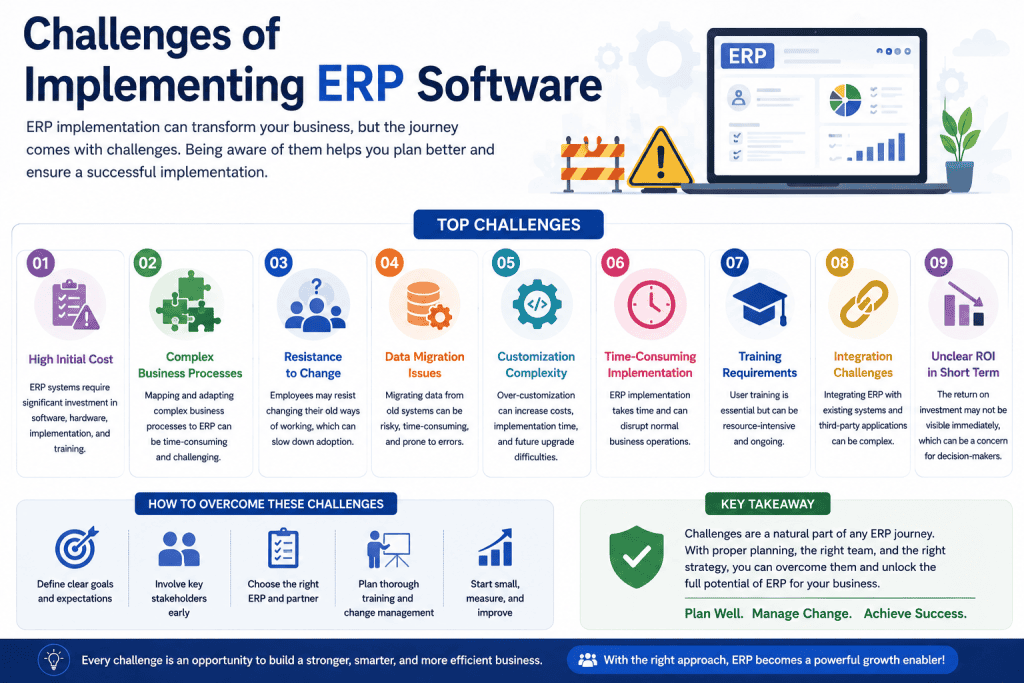
15.Challenges of Implementing ERP Software
Although ERP software can improve efficiency, reporting, inventory management, and business operations, implementing an ERP system is not always easy. Businesses need to consider several ERP implementation challenges before choosing and deploying a solution.
1. Initial Investment
ERP implementation can require a significant initial investment. Costs may include software licenses or subscriptions, hosting, implementation, customization, data migration, training, and integrations.
Businesses should calculate the total cost of ownership (TCO) rather than considering only the ERP software price.
2. Employee Resistance
Employees may resist a new ERP system because they are comfortable with existing processes or are concerned about learning new technology. Poor user adoption can reduce the benefits of ERP software.
Involving employees early and explaining how the new system will improve their daily work can help reduce resistance.
3. Data Migration
Moving existing customer, supplier, product, inventory, accounting, and employee data into a new ERP system can be challenging.
Incorrect, duplicate, or incomplete data can create problems after implementation. Businesses should clean, validate, and test their data before migration.
4. Employee Training
Even a powerful ERP system will not deliver results if employees do not know how to use it properly.
Training should cover the specific modules and workflows employees use, such as sales, accounting, inventory, purchasing, HR, and reporting.
5. Customization
Businesses often want ERP software to match their existing processes exactly. Excessive customization, however, can increase development costs, implementation time, and future maintenance requirements.
A better approach is to use standard ERP features whenever possible and customize only where there is a clear business requirement.
6. Implementation Time
ERP implementation can take weeks or months depending on the size and complexity of the business. Multiple modules, branches, integrations, data migration, and customization can increase the implementation timeline.
A realistic implementation plan with clear milestones helps businesses avoid unnecessary delays.
7. Poor Planning
Poor planning is one of the major causes of ERP implementation problems. Businesses may fail to define their requirements, business processes, responsibilities, budget, or implementation timeline before starting the project.
Before implementation, organizations should clearly define their objectives, required modules, users, workflows, data requirements, and expected outcomes.
8. Vendor Selection
Choosing the wrong ERP vendor can create long-term problems. Businesses should evaluate the vendor’s experience, implementation capability, support quality, pricing model, scalability, security, and industry expertise.
The cheapest ERP solution is not always the best option. Businesses should select a vendor based on overall value, reliability, support, and long-term business requirements.
How to Reduce ERP Implementation Risks
Businesses can reduce ERP implementation risks by following a structured approach:
- Define clear business requirements before selecting an ERP.
- Set a realistic budget and implementation timeline.
- Choose an ERP that can scale with business growth.
- Select an experienced and reliable ERP implementation partner.
- Clean and validate data before migration.
- Provide practical training for employees.
- Start with essential modules instead of implementing everything at once.
- Minimize unnecessary customization.
- Test workflows and integrations before going live.
- Monitor the system after implementation and provide ongoing support.
Final Thoughts
ERP implementation is a major business technology project, not simply a software installation. Proper planning, employee training, clean data, realistic budgeting, and careful vendor selection can significantly reduce implementation risks and help businesses achieve better long-term results from their ERP investment.
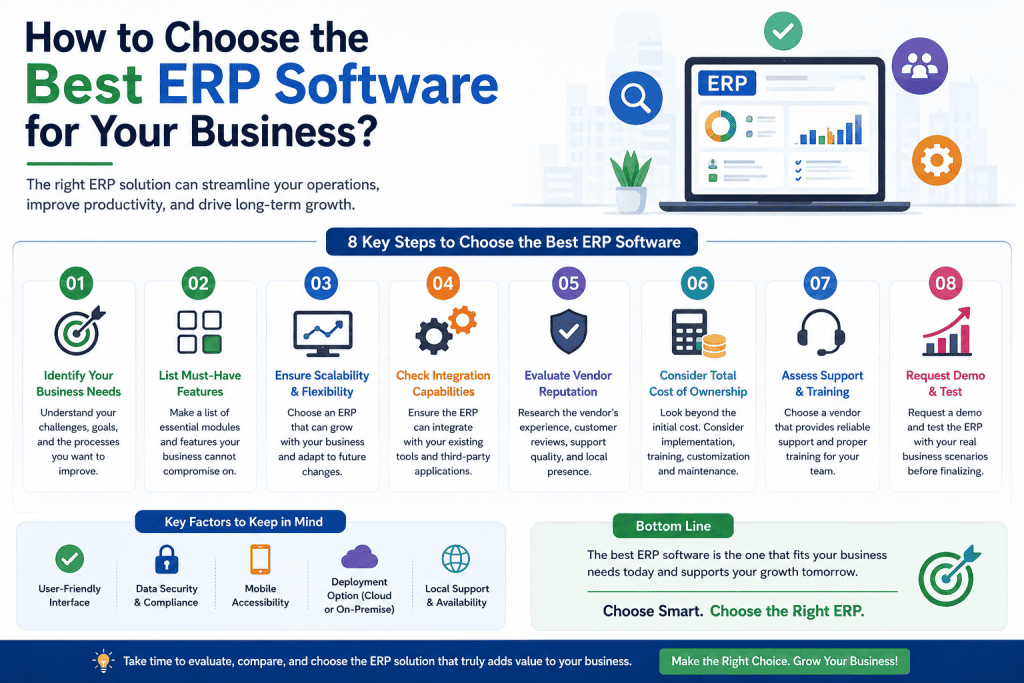
16.How to Choose the Best ERP Software for Your Business?
Choosing the best ERP software for your business requires more than comparing prices or features. The right ERP should solve your current business problems, support your daily operations, and scale as your business grows.
Follow these steps before selecting an ERP solution:
For small businesses, choosing the right ERP requires careful consideration of features, pricing, scalability, ease of use, and future growth. If you are specifically looking for an ERP solution for a small business, see our detailed guide to the best ERP software for small business.
1. Identify Your Business Problems
Start by identifying the operational problems you want the ERP to solve. Common challenges include inventory errors, manual accounting, poor reporting, inefficient sales processes, and lack of centralized business data.
2. Define the Required ERP Modules
Determine which modules your business actually needs, such as Accounting, Inventory, Sales, Purchase, CRM, HR, Manufacturing, POS, or eCommerce. Avoid paying for unnecessary modules.
3. Determine the Number of Users
Estimate how many employees will use the ERP system. ERP pricing is often influenced by the number of users, so identify both current and expected future users.
4. Set Your ERP Budget
Consider the total cost, including software, hosting, implementation, customization, training, integration, and ongoing support. A clear budget makes vendor comparison easier.
5. Check Customization Options
Make sure the ERP can support your specific workflows, reports, approval processes, and business requirements. Choose a system that offers flexibility without requiring excessive custom development.
6. Check Scalability
Your ERP should be able to grow with your business. Consider future requirements such as more users, branches, products, transactions, and additional modules.
7. Evaluate Security
Review user permissions, data protection, backups, access controls, software updates, and other security features before choosing an ERP.
8. Check Integrations
Make sure the ERP can integrate with the tools your business already uses, such as payment gateways, eCommerce platforms, POS systems, banking services, CRM tools, and third-party applications.
9. Request an ERP Demo
Request a live demo and ask the vendor to demonstrate the actual workflows your business needs. A demo is more useful than relying only on feature lists.
10. Compare ERP Vendors
Compare vendors based on features, pricing, implementation experience, customization, scalability, customer reviews, and support quality rather than price alone.
11. Check Support and Maintenance
Ask about technical support, software updates, bug fixes, training, maintenance, response times, and support costs after implementation.
12. Start With an Implementation Plan
Before purchasing, create a clear ERP implementation plan covering configuration, data migration, customization, user training, testing, deployment, and post-launch support.
Final Tip
The best ERP software for your business is not necessarily the cheapest or the one with the most features. Choose the solution that provides the right combination of functionality, scalability, security, support, customization, and overall value for your business.
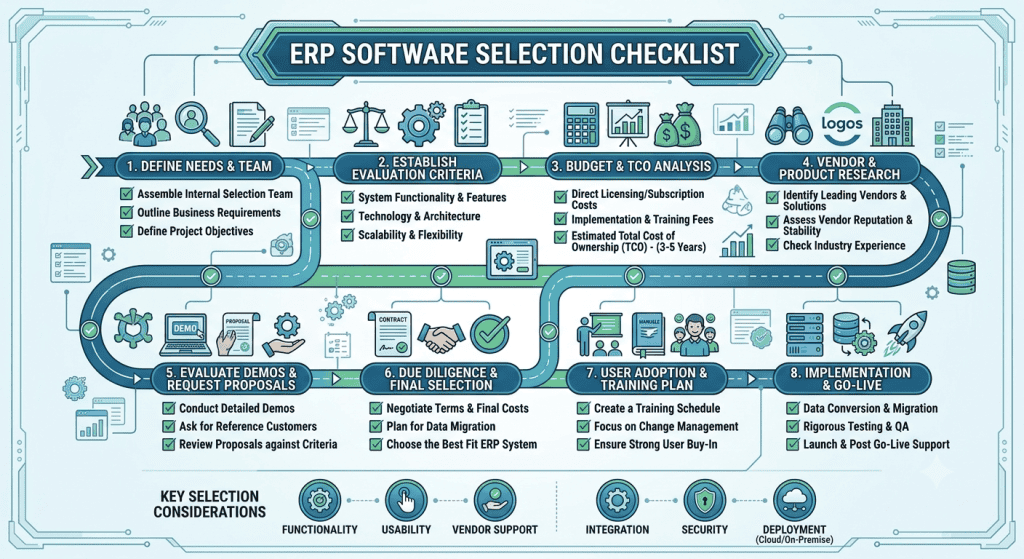
17.ERP Software Selection Checklist
Choosing the right ERP software requires more than comparing prices. Use this ERP software selection checklist to evaluate the features, costs, security, and support your business needs before making a decision.
ERP Selection Checklist
☐ Required ERP modules
☐ Number of users
☐ Cloud or on-premise deployment
☐ Customization requirements
☐ Accounting & finance
☐ Inventory management
☐ Sales management
☐ CRM
☐ Reporting & analytics
☐ Security & user permissions
☐ Data backup & recovery
☐ Third-party integrations
☐ Employee training
☐ Technical support & maintenance
☐ Total Cost of Ownership (TCO)
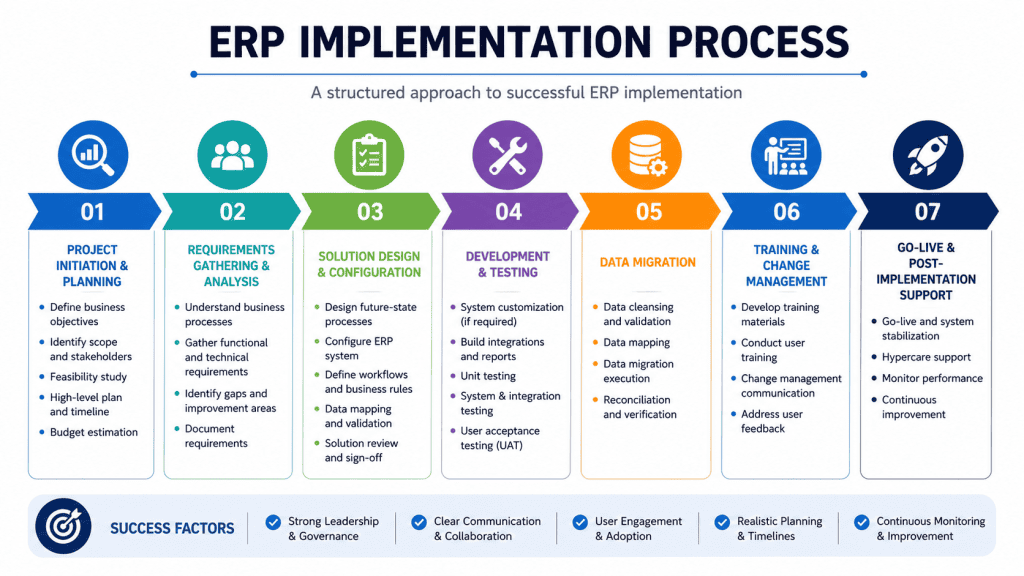
18.ERP Implementation Process
A successful ERP implementation process helps businesses move from manual or disconnected systems to an integrated business management solution. A structured implementation reduces operational disruption, improves user adoption, and ensures the ERP system matches the company’s actual business requirements.
The typical ERP implementation process includes the following steps:
1. Business Analysis
Understand the company’s current operations, challenges, workflows, departments, and business goals.
2. Requirement Planning
Identify the required ERP modules, features, users, integrations, reports, and customization requirements.
3. ERP Selection
Compare ERP solutions based on features, pricing, scalability, industry suitability, customization options, and support.
4. Configuration
Configure the ERP system according to the company’s standard business processes, users, permissions, workflows, and settings.
5. Customization
Develop custom features, reports, workflows, or integrations when standard ERP functionality does not meet specific business requirements.
6. Data Migration
Transfer important business data such as customers, suppliers, products, inventory, accounting records, and employees into the new ERP system.
7. Testing
Test the ERP system, workflows, reports, integrations, user permissions, and business processes before deployment.
8. Employee Training
Train employees and managers to use the ERP software correctly and ensure smooth adoption across departments.
9. Go Live
Launch the ERP system for daily business operations after completing configuration, migration, testing, and training.
10. Support & Optimization
Monitor system performance, resolve issues, provide ongoing support, and optimize the ERP system as business requirements change.
A well-planned ERP implementation process is essential for achieving the full value of ERP software while minimizing implementation risks and business disruption.
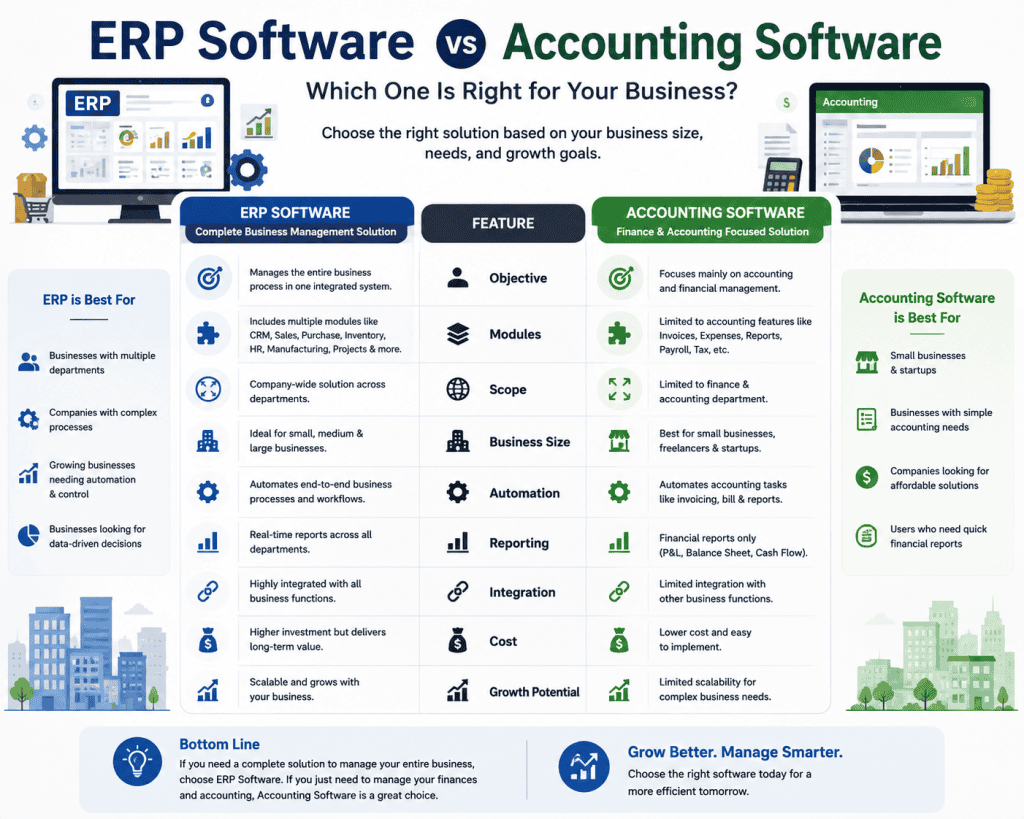
19.ERP Software vs Accounting Software
Many business owners in Bangladesh assume that accounting software and ERP software are the same. They are not.
Accounting software primarily focuses on financial management, such as recording transactions, managing accounts, tracking expenses, and preparing financial reports.
ERP software goes beyond accounting by connecting multiple business functions—including accounting, inventory, sales, purchasing, CRM, HR, manufacturing, and reporting—within one integrated system.
While accounting software focuses mainly on financial transactions, ERP software integrates accounting with inventory, sales, purchasing, HR, and other business operations. If you are unsure which solution is right for your business, read our detailed comparison of ERP vs Accounting Software.
ERP vs Accounting Software: Key Differences
| Feature | Accounting Software | ERP Software |
|---|---|---|
| Accounting | Core function | Integrated module |
| Inventory | Basic or limited | Advanced inventory management |
| Sales | Invoicing and sales records | Complete sales workflow |
| Purchase | Purchase records and bills | Complete purchasing process |
| CRM | Usually limited or unavailable | Integrated CRM |
| HR | Usually limited | HR and employee management |
| Manufacturing | Usually unavailable | Production and manufacturing management |
| Reporting | Financial reports | Financial + operational + business reports |
| Integration | Limited integrations | Integrates multiple business functions and systems |
Accounting Software Is Not an ERP
Accounting software can be sufficient for a small business that mainly needs bookkeeping, invoicing, expense tracking, and financial reporting.
However, businesses with inventory, multiple departments, sales teams, purchasing operations, manufacturing, HR, or multiple branches may need a complete ERP system.
For example, a trading company may use accounting software to track sales and expenses, but an ERP can connect its sales, inventory, purchasing, customer management, accounting, and reporting in one system.
Which One Should You Choose?
Choose accounting software if your primary requirement is financial management.
Choose ERP software if you need to manage and connect multiple business operations from a single platform.
The key difference is simple: accounting software manages finances, while ERP software connects and manages the broader business.
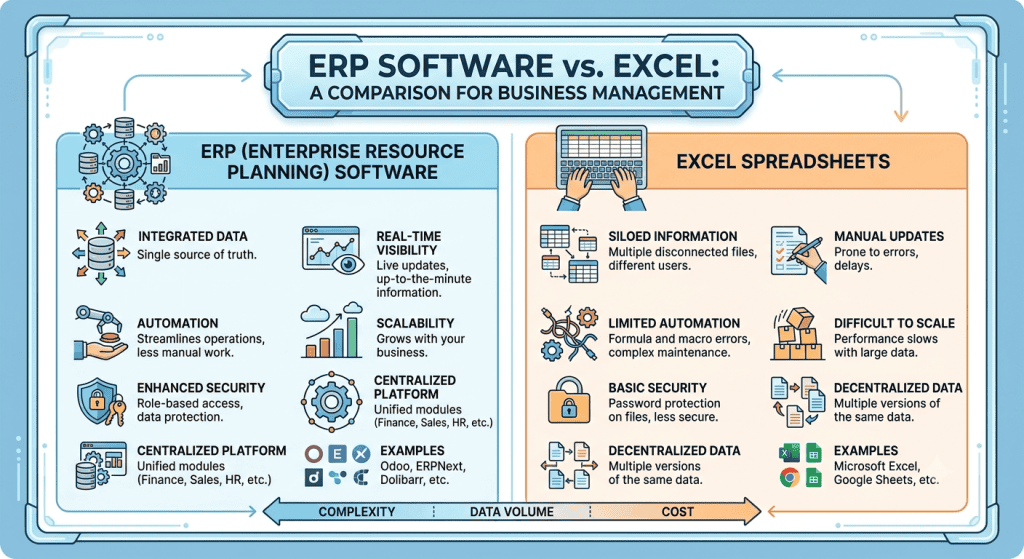
20.ERP Software vs Excel
Excel is useful for basic record-keeping and small business tasks, but it becomes difficult to manage when a business grows and handles large amounts of data. ERP software provides a centralized and automated system for managing business operations.
Excel
With Excel, businesses often rely on:
- Manual data entry – Employees enter and update information manually.
- Separate files – Sales, inventory, accounting, and employee data may be stored in different spreadsheets.
- Limited automation – Automation is possible but often requires additional formulas, macros, or tools.
- Data duplication – The same information may be entered into multiple files, increasing the risk of errors.
ERP Software
ERP software connects business operations through a centralized system:
- Centralized data – Business information is stored in one integrated system.
- Automated processes – Routine tasks such as inventory updates, invoicing, and reporting can be automated.
- Integrated operations – Sales, accounting, inventory, purchasing, HR, and other departments can work together.
- Real-time information – Managers can access updated business data and reports whenever they need them.
ERP Software vs Excel: Quick Comparison
| Factor | Excel | ERP Software |
|---|---|---|
| Data Management | Separate files | Centralized system |
| Data Entry | Mostly manual | Automated workflows |
| Automation | Limited | Extensive |
| Data Duplication | Higher risk | Reduced |
| Department Integration | Limited | Integrated |
| Reporting | Manual or semi-automated | Real-time reports |
| Scalability | Limited for complex operations | Designed for business growth |
For small businesses with simple requirements, Excel can still be useful. However, when a business needs centralized data, automation, real-time reporting, and integrated business management, ERP software can provide a more scalable solution.
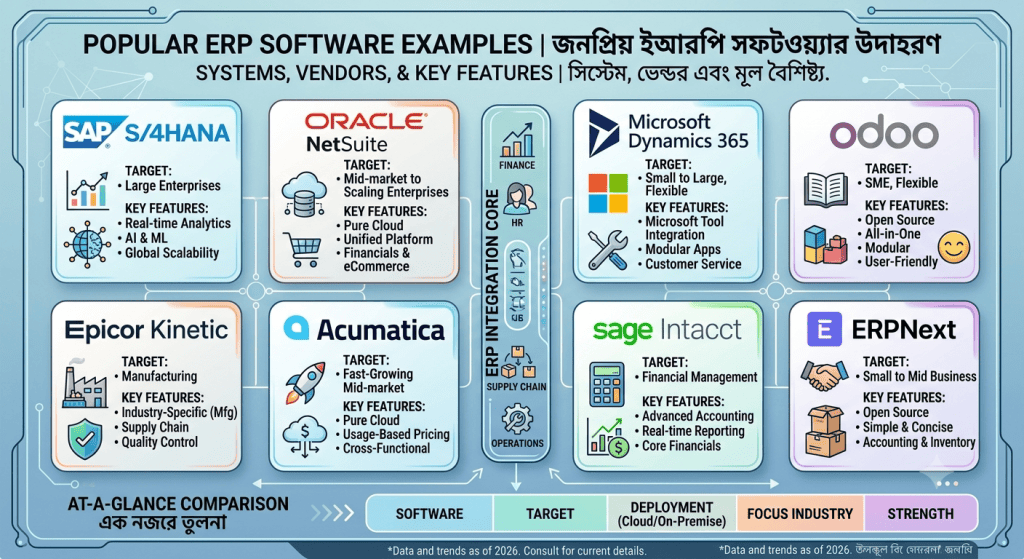
21.Examples of Popular ERP Software
There are many ERP software solutions available for businesses of different sizes and industries. Instead of choosing an ERP simply because it is popular, businesses should evaluate its features, pricing, scalability, customization options, and suitability for their specific business requirements.
Some well-known ERP software examples include Odoo, SAP, Microsoft Dynamics, Oracle ERP, and ERPNext.
Odoo
Odoo is a modular ERP platform that offers applications for accounting, inventory, sales, CRM, manufacturing, HR, eCommerce, and more. Its modular structure makes it suitable for small and medium-sized businesses as well as larger organizations with more complex requirements.
Best suited for: Small to medium-sized businesses, growing companies, and businesses that need flexible customization.
SAP
SAP offers enterprise-level ERP solutions designed to manage complex business operations across finance, supply chain, manufacturing, procurement, human resources, and other areas.
Best suited for: Large organizations and enterprises with complex processes and advanced ERP requirements.
Microsoft Dynamics
Microsoft Dynamics provides business management and ERP solutions that integrate with the wider Microsoft ecosystem. Its solutions can support finance, supply chain, sales, customer service, and other business functions.
Best suited for: Small, medium, and large businesses that already use Microsoft products and need integrated business management.
Oracle ERP
Oracle provides cloud-based ERP solutions with capabilities covering financial management, procurement, project management, supply chain, and other enterprise functions.
Best suited for: Medium to large organizations and enterprises requiring comprehensive cloud ERP capabilities.
ERPNext
ERPNext is an open-source ERP platform that provides modules for accounting, inventory, sales, purchasing, manufacturing, HR, projects, and other business operations.
Best suited for: Small and medium-sized businesses looking for an open-source and customizable ERP solution.
ERP Software Comparison by Business Use Case
| ERP Software | Typical Business Size | Key Strength |
|---|---|---|
| Odoo | Small to Large | Modular and highly customizable |
| SAP | Medium to Large | Complex enterprise operations |
| Microsoft Dynamics | Small to Large | Microsoft ecosystem integration |
| Oracle ERP | Medium to Large | Cloud-based enterprise management |
| ERPNext | Small to Medium | Open-source and flexible |
How to Choose the Right ERP Software?
There is no single ERP software that is the best choice for every business. The right solution depends on factors such as business size, industry, budget, required modules, number of users, customization needs, integrations, and future growth plans.
A small trading company may need only accounting, inventory, purchasing, and sales, while a large manufacturing organization may require production planning, supply chain management, quality control, HR, finance, and advanced reporting.
Therefore, businesses should compare ERP solutions based on their specific requirements and total cost of ownership, rather than popularity alone.
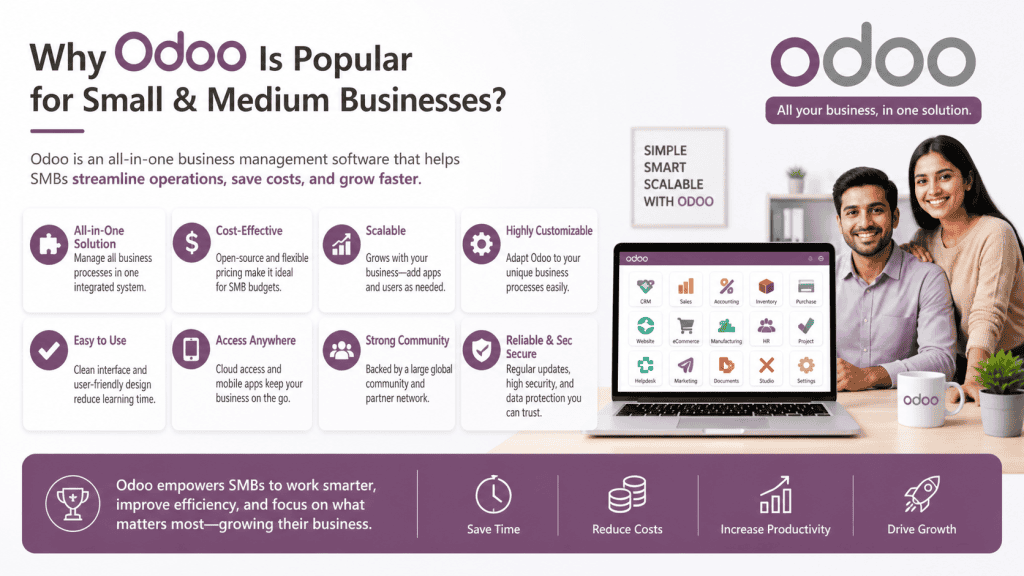
22.Why Odoo Is Popular for Small & Medium Businesses?
Odoo is widely considered by small and medium-sized businesses looking for an ERP system that can manage multiple business operations from a single platform. One of its key advantages is its modular architecture, which allows businesses to start with the applications they need and add more as the company grows.
Instead of implementing every ERP function at once, a business can select relevant modules such as Accounting, CRM, Sales, Purchase, Inventory, Manufacturing, Website, eCommerce, POS, and HR.
Key Odoo ERP Features for SMEs
Modular Architecture:
Businesses can choose the ERP modules that match their current requirements and expand the system as their operations become more complex.
Accounting:
Odoo provides accounting and financial management features for managing invoices, payments, expenses, reporting, and other financial processes.
CRM and Sales:
CRM and sales tools help businesses manage leads, opportunities, quotations, customers, and sales activities in one system.
Purchase and Inventory:
Businesses can manage suppliers, purchase orders, stock movements, warehouses, products, and inventory operations through integrated modules.
Manufacturing:
Manufacturing businesses can use dedicated tools for production planning, bills of materials, work orders, and manufacturing operations.
Website, eCommerce and POS:
Odoo can also connect website, online sales, and point-of-sale operations with other business processes, helping businesses maintain centralized data.
Human Resources:
HR-related applications can support employee information, recruitment, attendance, leave, and other workforce management activities.
Customization and Integration:
Businesses with specific workflows can customize certain aspects of the system or integrate Odoo with other business applications. However, customization can increase implementation and maintenance costs.
Open-Source and Community Ecosystem:
Odoo has an open-source Community edition and a broad ecosystem of developers, applications, and implementation partners. This can provide businesses with additional flexibility when selecting and extending their ERP system.
Is Odoo the Right ERP for Every Business?
Not necessarily. Odoo is one option among many ERP solutions available to small and medium-sized businesses. Its modular structure and broad range of business applications can make it suitable for companies that want to manage multiple functions within one platform.
However, businesses should compare features, pricing, customization requirements, implementation costs, support, integrations, scalability, and total cost of ownership before choosing an ERP system.
The best ERP software is ultimately the one that fits the company’s operational requirements, budget, and long-term growth strategy.
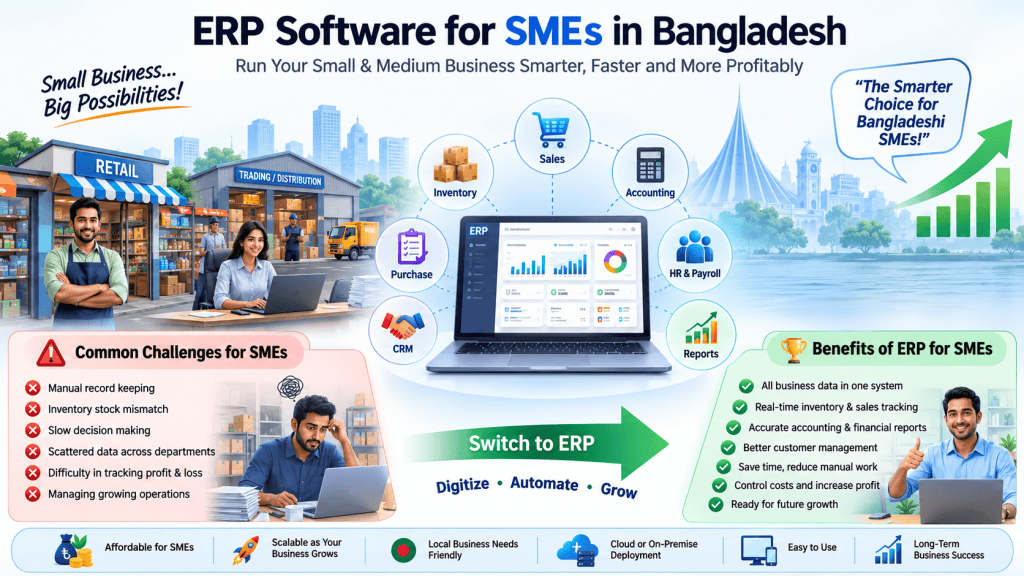
23.ERP Software for SMEs in Bangladesh
Small and medium-sized enterprises (SMEs) in Bangladesh often manage sales, inventory, accounting, purchasing, employees, and customer information using separate systems or spreadsheets. As the business grows, this can lead to data duplication, manual errors, stock management problems, and limited business visibility.
An ERP system for SMEs in Bangladesh can bring these operations together in one centralized platform, helping businesses improve efficiency, accuracy, and decision-making.
Common ERP Problems Faced by SMEs
Bangladeshi SMEs commonly face challenges such as:
- Manual accounting and bookkeeping
- Inventory and stock management issues
- Difficulty tracking sales and purchases
- Duplicate or inaccurate business data
- Limited financial reporting
- Poor coordination between departments
- Difficulty managing multiple branches
- Lack of real-time business information
An ERP solution can connect these processes and provide a single source of business data.
Essential ERP Modules for SMEs
SMEs do not necessarily need every ERP module from the beginning. The most commonly required modules include:
- Accounting & Finance – Invoicing, expenses, payments, and financial reports
- Inventory Management – Stock tracking, warehouses, and product movement
- Sales Management – Quotations, orders, customers, and sales tracking
- Purchase Management – Suppliers, purchase orders, and procurement
- CRM – Leads, opportunities, and customer management
- HR & Payroll – Employee records, attendance, and payroll
- Reporting & Analytics – Business performance and financial insights
The right modules should be selected based on the company’s actual business requirements.
ERP Budget Considerations for SMEs
ERP pricing for SMEs depends on several factors, including the number of users, required modules, customization, hosting, implementation, training, integrations, and ongoing support.
Instead of choosing an ERP based only on its initial price, businesses should consider the total cost of ownership (TCO) and the long-term value the system can provide.
A lower-cost ERP may become expensive if it requires extensive customization, technical support, or third-party integrations.
Cloud ERP for SMEs in Bangladesh
Cloud ERP is an attractive option for many small and medium-sized businesses because it does not require the company to maintain its own physical server infrastructure.
With cloud ERP, businesses can typically access their system through an internet connection from computers and other supported devices. It can also make it easier to scale users and business operations as the company grows.
Cloud ERP can be particularly useful for SMEs that want to reduce upfront infrastructure costs and avoid managing complex server environments.
ERP Implementation Approach for SMEs
SMEs should avoid trying to implement every ERP feature at once. A practical approach is to start with the most important business processes and expand gradually.
A typical implementation may follow these steps:
- Identify business requirements
- Select the essential ERP modules
- Configure the system
- Import or migrate existing data
- Train employees
- Test the workflows
- Launch the ERP system
- Add additional modules when required
Why Modular ERP Implementation Makes Sense?
Modular ERP implementation allows SMEs to start with the functions they need most and add additional modules as the business grows.
For example, a small trading company may initially implement Accounting, Sales, Purchase, and Inventory. Later, it can add CRM, HR, manufacturing, eCommerce, or advanced reporting.
This approach can reduce initial costs, simplify employee training, minimize implementation risks, and make ERP adoption easier for growing businesses.
For SMEs in Bangladesh, the best ERP strategy is not necessarily to implement the largest system immediately. A scalable and modular ERP solution that grows with the business can often provide better long-term value.
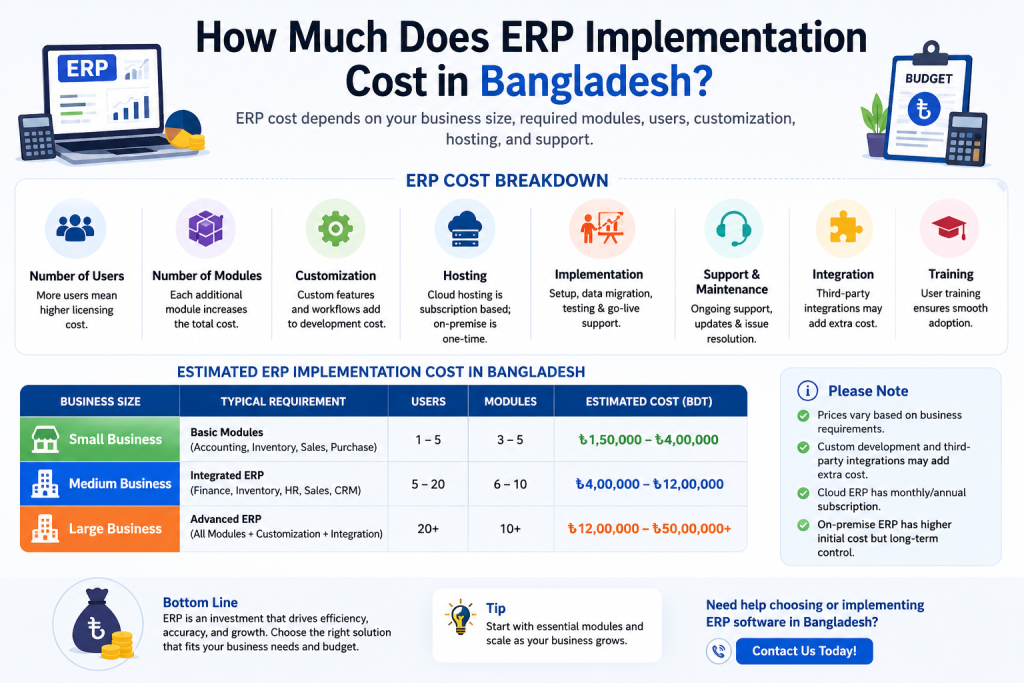
24.How Much Does ERP Implementation Cost in Bangladesh?
The ERP implementation cost in Bangladesh depends on more than the software price. A business must consider the complete implementation process, including software licensing, hosting, customization, data migration, employee training, support, and system integration.
The total cost varies based on business size, number of users, ERP modules, complexity of operations, and customization requirements.
Key Factors Affecting ERP Implementation Cost
1. Software License
The ERP license or subscription is often the starting cost. Pricing may depend on the number of users, modules, or subscription plans.
2. Hosting
Cloud-based ERP may include hosting in the subscription, while self-hosted ERP requires a server or VPS. Hosting costs can vary depending on performance, storage, security, and backup requirements.
3. Customization
Custom workflows, reports, dashboards, forms, approval processes, and business-specific features can increase the ERP implementation cost.
4. Data Migration
Moving existing customer, product, inventory, accounting, supplier, and transaction data into the new ERP system requires data cleaning, formatting, migration, and testing.
5. Training
Employees need proper training to use the ERP effectively. Training costs depend on the number of users, departments, and complexity of the system.
6. Support and Maintenance
Post-implementation support may include troubleshooting, updates, security maintenance, bug fixing, backups, and system monitoring. Ongoing support should be included when calculating the total ERP investment.
7. Integration
Integrating the ERP with eCommerce platforms, POS systems, payment gateways, banking systems, CRM tools, shipping platforms, or other business software may require additional development.
ERP Implementation Cost in Bangladesh: What to Expect
There is no single fixed ERP implementation price in Bangladesh. A small business with basic requirements may have a relatively low implementation cost, while a medium or large organization with multiple departments, branches, integrations, and custom workflows may require a significantly larger investment.
Therefore, businesses should compare the total cost of ERP implementation, rather than focusing only on the software license price. A proper cost assessment should include software, hosting, customization, migration, training, support, and integration.
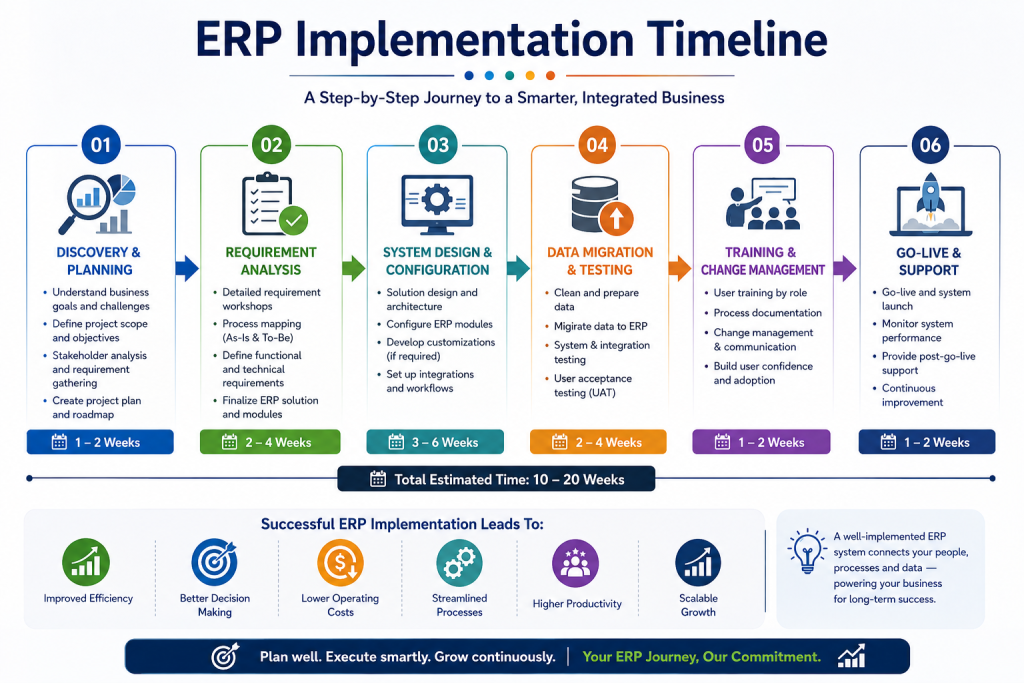
25. ERP Implementation Timeline
The ERP implementation timeline depends on the size of the business, number of ERP modules, data volume, customization requirements, and integration needs. A simple ERP setup can be completed relatively quickly, while a complex implementation for a large organization may take several months.
ERP Implementation Timeline by Business Size
| Business Type | Implementation Level | Typical Timeline |
|---|---|---|
| Small Business | Basic Implementation | 2–6 weeks |
| Medium Business | Medium Implementation | 1–3 months |
| Large Business | Complex Implementation | 3–6+ months |
These timelines are estimates. The actual ERP implementation time depends on the business processes and project scope.
What Affects ERP Implementation Time?
Several factors can increase or decrease the time required to implement ERP software:
Number of Modules: Implementing accounting, inventory, sales, purchase, HR, manufacturing, CRM, and other modules requires more configuration and testing.
Data Volume: Migrating large amounts of customer, product, inventory, accounting, and transaction data can take additional time.
Customization: Custom workflows, reports, dashboards, forms, and business processes generally increase the implementation timeline.
Number of Users: A larger number of users requires more user configuration, permissions, testing, and training.
Integration: Connecting the ERP with eCommerce platforms, POS systems, payment gateways, banking systems, CRM tools, or other software can add development and testing time.
Training: Employees need sufficient training to use the new ERP system correctly. Larger organizations usually require more training sessions and user support.
How to Reduce ERP Implementation Time
Businesses can speed up ERP implementation by clearly defining requirements, limiting unnecessary customization, preparing data in advance, assigning responsible team members, and providing proper employee training.
The goal should not be to implement ERP as quickly as possible, but to achieve a smooth ERP implementation with minimal disruption to business operations.

26. Common ERP Mistakes Businesses Should Avoid
Choosing and implementing ERP software is a major business decision. Many companies make avoidable mistakes during ERP selection and implementation, which can lead to higher costs, poor user adoption, and operational problems.
Here are the most common ERP mistakes businesses should avoid:
❌ 1. Choosing the Cheapest ERP
The cheapest ERP software is not always the most cost-effective option. Businesses should compare features, scalability, support, customization, security, and total cost of ownership before making a decision.
❌ 2. Skipping the ERP Demo
Buying ERP software without taking a proper demo can lead to unexpected limitations. Always test important features and workflows before selecting an ERP solution.
❌ 3. Not Analyzing Business Requirements
Businesses should clearly identify their processes, problems, users, required modules, integrations, and reporting needs before choosing ERP software. Without proper requirement analysis, the wrong system may be selected.
❌ 4. Over-Customizing the ERP
Excessive customization can increase implementation costs, maintenance requirements, and upgrade complexity. Businesses should use standard ERP functionality wherever possible and customize only when necessary.
❌ 5. Ignoring Employee Training
Even a powerful ERP system can fail if employees do not know how to use it. Proper ERP training helps improve adoption, reduce errors, and ensure that employees can use the system effectively.
❌ 6. Poor Data Migration Planning
Moving inaccurate, duplicate, or incomplete data into a new ERP can create serious problems. Businesses should clean, validate, organize, and test their data before migration.
❌ 7. Not Checking Vendor Support
ERP implementation does not end after installation. Businesses should evaluate the vendor’s technical support, response time, maintenance policy, updates, and long-term availability before signing a contract.
❌ 8. Implementing Every Module at Once
Trying to implement every ERP module simultaneously can make the project unnecessarily complex. A phased ERP implementation can reduce risk and allow employees to adapt gradually.
Key Takeaway
Successful ERP implementation requires more than choosing the right software. Businesses should focus on proper requirement analysis, realistic budgeting, employee training, data migration, vendor support, and controlled customization to achieve better long-term results.

27. Frequently Asked Questions About ERP Software
1. What is ERP software?
ERP software is a business management system that integrates core business processes such as accounting, inventory, sales, purchasing, HR, manufacturing, and reporting into one centralized platform.
2. What does ERP stand for?
ERP stands for Enterprise Resource Planning. It refers to software that helps businesses manage and integrate their resources, operations, data, and business processes.
3. How much does ERP software cost?
ERP software costs vary depending on the number of users, modules, customization, hosting, implementation, integrations, training, and support. Small businesses may start with a relatively low-cost solution, while larger ERP implementations can require significantly higher investment.
4. Is ERP suitable for small businesses?
Yes. ERP software can be suitable for small businesses when the system matches their operational needs and budget. Small businesses can start with essential modules such as accounting, inventory, sales, and purchasing.
5. What modules does ERP include?
Common ERP modules include Accounting, Inventory, Sales, Purchase, CRM, HR, Manufacturing, Point of Sale (POS), Project Management, and Reporting. The required modules depend on the business type.
6. Is ERP software expensive?
ERP software is not necessarily expensive, but the total cost depends on the business requirements. Licensing, implementation, customization, hosting, training, integrations, and ongoing support can all affect the final ERP cost.
7. What is cloud ERP?
Cloud ERP is ERP software hosted on cloud infrastructure and accessed through the internet. Businesses generally do not need to maintain their own ERP server, making cloud ERP convenient for remote access, updates, and scalability.
8. What is open-source ERP?
Open-source ERP is software whose source code is available for modification and customization. It can provide greater flexibility and potentially lower licensing costs, although businesses may still pay for hosting, implementation, customization, and technical support.
9. Is Odoo an ERP?
Yes. Odoo is an ERP platform that provides integrated business applications for areas such as accounting, sales, inventory, CRM, manufacturing, purchasing, HR, and eCommerce.
10. How long does ERP implementation take?
ERP implementation can take anywhere from a few weeks to several months, depending on the business size, number of users, modules, data migration, customization, integrations, and implementation complexity.
11. Can ERP software be customized?
Yes. Many ERP systems can be customized with additional fields, workflows, reports, dashboards, modules, approval processes, and integrations to match specific business requirements.
12. Can ERP integrate with eCommerce?
Yes. ERP software can integrate with eCommerce platforms to synchronize products, inventory, orders, customers, payments, and other business data. This can reduce manual data entry and improve operational efficiency.
13. Is ERP better than Excel?
ERP can be better than Excel for businesses with complex operations, multiple users, large amounts of data, inventory management, accounting, or multiple branches. Excel can still be useful for simple calculations and smaller operations.
14. Which ERP is best for SMEs?
The best ERP for SMEs depends on the company’s industry, budget, required modules, number of users, customization needs, and growth plans. Businesses should compare features, pricing, scalability, support, and total cost of ownership before choosing an ERP.
15. How do you choose ERP software?
To choose the right ERP software, identify your business requirements first. Then compare ERP features, modules, pricing, customization, integrations, security, implementation services, support, scalability, and vendor reliability before making a decision.
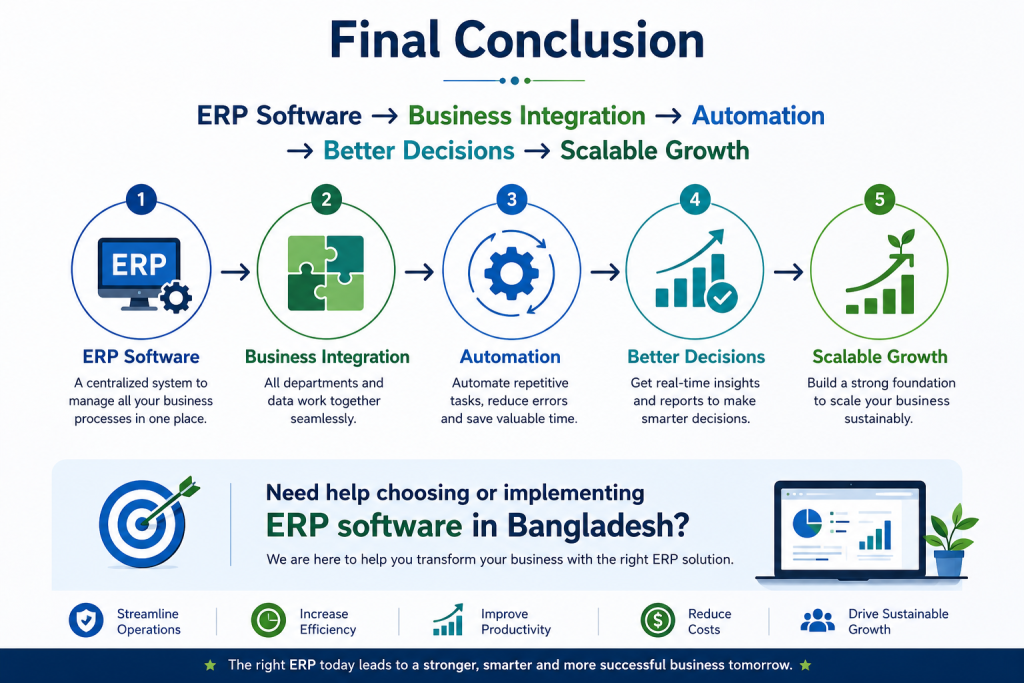
28. Final Conclusion
ERP software is more than a business management system—it connects different areas of your business and helps you manage operations from a single platform.
ERP Software → Business Integration → Automation → Better Decisions → Scalable Growth
From accounting and inventory to sales, purchasing, HR, manufacturing, and reporting, the right ERP solution can improve efficiency, reduce manual work, and give business owners better visibility into their operations.
For businesses in Bangladesh, choosing the right ERP depends on business size, required modules, number of users, customization needs, budget, and long-term growth plans. Instead of choosing the cheapest option, focus on the overall value, scalability, support, and total cost of ownership.
Need Help Choosing ERP Software in Bangladesh?
Need help choosing or implementing ERP software in Bangladesh? Get professional guidance to identify the right ERP solution, modules, customization, implementation strategy, and pricing for your business.